
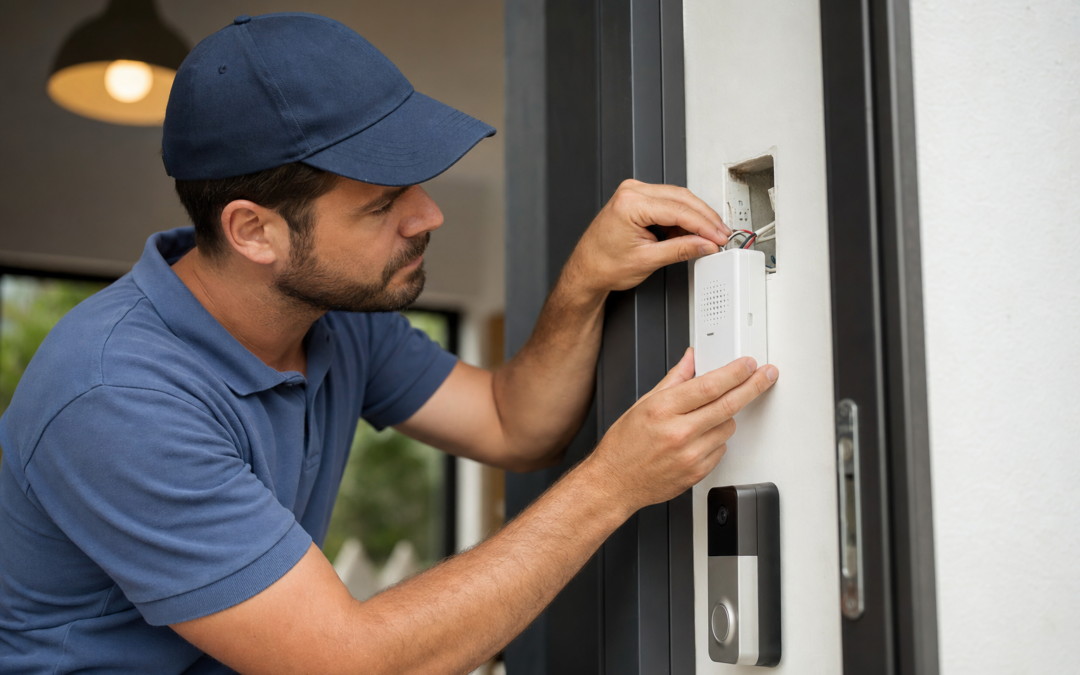
Wireless and wired video doorbells are some of the most practical upgrades you can add to a home’s security system, but integrating them with your existing chime system can get confusing fast. Whether you’re hoping to keep your old mechanical chime, want a digital chime, or need a plug-in wireless unit, understanding compatibility and proper wiring is essential for a smooth installation and reliable performance.
In this guide, we’ll dive deep into how video doorbells interact with different chime types, what wiring setups are required, and how to avoid common pitfalls that can leave you without a working doorbell sound. Along the way, you’ll find specific tips for both DIYers and those considering a professional install.
Understanding Video Doorbell and Chime Compatibility
Before you pick a video doorbell, it’s important to know that not all models work with every type of chime. The most common chime types in US homes are:
- Mechanical chimes – These have physical strikers that hit metal bars to create a “ding-dong” sound.
- Digital chimes – These play a digital melody through a speaker.
- Wireless plug-in chimes – These connect using RF signals or Wi-Fi and plug into a wall outlet.
Many popular video doorbells—such as the Arlo Video Doorbell 2K—support both wired and wireless options, but there are important compatibility notes with each chime style. Some models only support mechanical chimes, while others require special adapters for digital chimes or work best with their own proprietary plug-in chimes.
Check your existing chime box for a model number or open it up to see if there are metal bars (mechanical) or a speaker with a circuit board (digital). This will inform your buying decision and wiring setup.
How Wired and Wireless Video Doorbells Differ
Video doorbells come in both wired and wireless (battery-powered) versions, and this choice affects chime compatibility and installation steps.
- Wired video doorbells use your home’s existing doorbell wiring, drawing power from the doorbell transformer. They can often trigger mechanical or digital chimes directly, depending on compatibility.
- Wireless (battery-powered) video doorbells don’t need existing wires and usually come with their own wireless chime that plugs into a wall outlet. Some can also be hardwired for trickle charging or to enable chime support.
Some hybrid models, like the Tapo 2K Wireless Smart Video Doorbell, offer both options. Choose a model based on whether you want to use your old chime or you’re fine with a new plug-in chime.

Tapo 2K Wireless Smart Video Doorbell w/Chime Review — Practical video doorbells from Tapo, summarized from hub features and listed measurements. Key figures include 2, 160, 2.13 .
Common Chime and Power Requirements
Most wired video doorbells in the US require a transformer outputting between 16V and 24V AC (volts, alternating current) and at least 10VA (volt-amps) of power. If your existing transformer is underpowered, the video doorbell may not work reliably or may fail to ring the chime.
Before installing, locate your transformer (often found in a basement, utility room, or near the electrical panel) and check its output. If it’s too weak, you’ll need to upgrade it. Many video doorbell manufacturers specify minimum requirements—always check your model’s manual for specifics.
For wireless models, battery life is the key concern. If you want continuous chime support and less frequent charging, look for models that allow hardwiring for trickle charging, even if they don’t require it for basic operation.
Mechanical vs. Digital Chime Compatibility
Wired video doorbells most reliably support mechanical chimes. The doorbell button completes a circuit, triggering the physical striker. Most video doorbells, including the Blink Video Doorbell, work seamlessly with these systems as long as the transformer is adequate.
Digital chimes are more complicated. Since they use circuit boards and speakers, some video doorbells may not send the correct signal to trigger the sound, or the chime may only partially ring. Many manufacturers offer a “chime adapter” or “chime connector”—a small module that wires into your chime box to ensure compatibility. Always check the manufacturer’s compatibility list or contact support before purchasing if you have a digital chime.
Some models, like the BOIFUN Video Doorbell Camera, skip these issues entirely by using a dedicated wireless chime.

Arlo Video Doorbell 2K (2nd Gen) Wireless or Wired Review — An editorial look at this Arlo option for video doorbells — specs first, marketing second. Key figures include 60, 1.45 , 0.45 pounds.
Wireless Plug-In Chimes: When and Why to Use Them
Wireless plug-in chimes are common with battery-powered video doorbells. These chimes:
- Plug into any standard wall outlet
- Pair with the doorbell using RF or Wi-Fi
- Usually offer multiple tones and adjustable volume
They’re ideal if your existing chime is incompatible or you want chime coverage in multiple rooms. Some brands, like Tapo and BOIFUN, include one or more plug-in chimes in the box. You can often buy extras to place around your home.
One limitation: wireless chimes typically do not integrate with your old chime wiring. You’ll rely solely on the included plug-in units for sound notifications. This is a simple, low-maintenance solution for most homes—especially if you don’t want to mess with wiring or your existing chime is obsolete.
Wiring a Video Doorbell: Step-by-Step Overview
Wiring a video doorbell is straightforward if you have basic electrical skills. Here’s a step-by-step overview for a typical wired installation:
- Turn off power to the doorbell circuit at the breaker panel.
- Remove your old doorbell button and disconnect the wires.
- Mount the new video doorbell’s bracket using the included hardware.
- Connect the wires to the video doorbell terminals—usually labeled “Front” and “Trans” (transformer). Polarity usually doesn’t matter for AC systems.
- Secure the doorbell to the bracket and restore power.
- Follow the app instructions to connect the doorbell to your Wi-Fi and test the chime function.
If you have a digital chime, install the manufacturer’s chime adapter module according to their instructions. For wireless models, skip the wiring and follow the pairing instructions for the plug-in chime.
What to Do If Your Chime Doesn’t Work
It’s common for the chime to stop working after a video doorbell installation. Here are troubleshooting tips:
- Double-check wiring connections – Loose or swapped wires can prevent the chime from working.
- Confirm transformer voltage – Use a multimeter to verify you have 16-24V AC at the doorbell terminals.
- Check for required chime adapters – Digital chimes often need a special module to work with video doorbells.
- Verify app settings – Some models let you toggle chime support or select chime type in their mobile app.
- Test with the old button – Reconnect your old doorbell button to see if the chime works. If it does, the issue is with the new video doorbell or its wiring.
- Consult the manual – Some brands (like Arlo or Blink) offer troubleshooting flowcharts in their documentation.
Still stuck? Most manufacturers have support lines or online chat for wiring and compatibility questions. It’s worth checking their video doorbell reviews and buying guides for model-specific advice.
How to Upgrade a Doorbell Transformer
If your transformer doesn’t meet your video doorbell’s voltage or power requirements, you’ll need to replace it. Here’s how:
- Turn off power at the breaker panel.
- Locate the transformer (often in the basement, garage, or near the breaker box).
- Note the wiring – Take a picture before disconnecting anything.
- Disconnect and remove the old transformer.
- Install the new transformer (16-24V AC, 10-30VA is typical for video doorbells), matching the wiring as before.
- Restore power and test the doorbell and chime.
If you’re not comfortable working with household electrical wiring, hire a licensed electrician for this step. Upgrading the transformer is often the key to fixing chime issues with high-draw video doorbells.
Special Considerations for Multi-Unit Chimes and Multiple Doorbells
Some homes have multi-unit chimes (e.g., one for the front and one for the back door) or want to add more than one video doorbell. Here’s what to know:
- Most video doorbells only trigger a single chime circuit. If you have multiple chimes, check the manufacturer’s support for multi-chime compatibility.
- Wiring two video doorbells (front and back) may require a relay or special wiring to ensure both can trigger the chime and receive power.
- Wireless models with plug-in chimes make it easy to add as many chimes as you want—just pair extra units through the app.
If you’re uncertain, consult your video doorbell’s installation guide or reach out to support for wiring diagrams. Some brands offer accessories for more complex chime setups.

BOIFUN Video Doorbell Camera Wireless Review — An editorial look at this BOIFUN option for video doorbells — specs first, marketing second. Key figures include 166, 2.5 , 2.4 .
Smart Home Integration and Chime Alternatives
Modern video doorbells often support smart home platforms, providing additional chime options:
- Amazon Alexa – Many doorbells can trigger Alexa-enabled devices to announce when someone is at the door. You can set custom routines for voice announcements or smart speaker chimes.
- Google Home – Similar integration lets your Google Nest speakers or displays act as a digital chime.
- IFTTT and other automations – Set up custom notifications, smart lights, or sirens to activate when the doorbell rings.
If your existing chime is unreliable or you want notifications in more rooms, leveraging smart speakers is a flexible way to expand coverage without running wires or buying more plug-in chimes.
Product Callouts: Top Video Doorbells for Chime Compatibility
- Tapo 2K Wireless Smart Video Doorbell w/Chime: Offers both wired and battery-powered modes, includes a dedicated plug-in chime, and is well-reviewed for its ease of installation and solid app controls. Read our full review.
- Arlo Video Doorbell 2K (2nd Gen): Flexible design supports both wired and wireless installs, and is compatible with mechanical chimes (digital chime support may require additional accessories). See details here.
- BOIFUN Video Doorbell Camera Wireless: Focuses on simplicity, including a plug-in chime and straightforward app pairing for fast setup with no wiring headaches. Read more.
- Blink Video Doorbell + Outdoor 4: Known for reliable motion alerts and streamlined wireless chime support, making it a solid pick for renters or those with older wiring. Review here.
Frequently Asked Questions About Video Doorbell Chimes and Wiring
- Can I use my existing chime with any video doorbell? Not always—mechanical chimes are almost always compatible, but digital chimes may require a chime adapter or may not be supported by some models.
- Do I need to upgrade my doorbell transformer? If your transformer is rated under 16V AC or 10VA, upgrading is recommended for reliable video doorbell performance.
- Can I have multiple chimes in my house? Yes—wireless plug-in chimes make this simple. For wired setups, check the manufacturer’s support for multi-chime compatibility.
- Will a battery-powered doorbell ring my old chime? Not unless it also supports hardwiring. Most battery-only models use a plug-in chime instead.
- Is it safe to install a video doorbell myself? Wiring is usually low-voltage, but always turn off power at the breaker before starting. When in doubt, hire a pro.
Final Tips: Buying and Installing the Right Video Doorbell
Choosing the right video doorbell and chime setup comes down to your home’s wiring, existing chime type, and personal preferences. Here are some final tips:
- Check compatibility before buying—especially if you want to keep your old chime.
- Consider a wireless model with plug-in chimes for the simplest installation.
- Upgrade your transformer if needed to avoid power issues.
- Use smart speakers for extra chime locations and custom notifications.
- Read product reviews and installation guides for model-specific advice and troubleshooting.
For more in-depth comparisons and product reviews, check out our video doorbell reviews and buying guides hub. With the right prep and a little patience, you’ll enjoy reliable, clear alerts at your front door—no matter what chime you choose.

Blink Video Doorbell + Outdoor 4 Review — Blink categories gear aimed at buyers who want clear specs before they click through. Key figures include 4 , 4, 1 .
Video Doorbell and Chime Compatibility Checklist
Before you start your installation, it’s helpful to run through a checklist to avoid compatibility headaches and ensure a smooth setup. Here’s a step-by-step guide:
- Identify your existing chime type: Is it mechanical, digital, or wireless? Open the chime box if unsure.
- Check transformer voltage: Locate your transformer and verify it outputs 16-24V AC and at least 10VA.
- Review doorbell requirements: Read your video doorbell’s manual for specific voltage, chime, and wiring needs.
- Determine if a chime adapter is needed: For digital chimes, check if your model requires an adapter or special wiring accessory.
- Plan wireless chime placement: For wireless/battery-powered models, decide where to plug in the chime for best audibility.
- Test your existing chime: Press the old doorbell button to confirm the chime and transformer are working before installation.
- Turn off power: Always shut off power at the breaker before handling doorbell wiring.
- Have tools ready: Gather a screwdriver, voltage tester, wire stripper, and mounting hardware.
- Download the app: Most video doorbells require app setup—install it on your phone in advance.
- Check Wi-Fi signal: Ensure your router provides a strong signal at the front door for video streaming.
Common Mistakes When Wiring Video Doorbells
Even experienced DIYers can run into trouble with video doorbell installations. Here are some of the most frequent mistakes and how to avoid them:
- Incorrect transformer voltage: Using an underpowered transformer may cause the doorbell or chime to malfunction. Always check and upgrade if necessary.
- Forgetting the chime adapter: Skipping a required chime adapter for digital chimes can result in no sound or partial operation.
- Loose or reversed wires: Not securing wires tightly, or swapping terminals, may prevent the doorbell or chime from working.
- Leaving power on during installation: This poses a shock hazard and can damage electronics—always turn off the circuit first.
- Mounting in poor Wi-Fi range: Wireless models need a strong signal. Test Wi-Fi at the install location before finalizing.
- Not updating firmware: Skipping the initial firmware update can lead to bugs, connectivity, or compatibility problems.
- Overlooking app permissions: Some features (like notifications or chime control) won’t work if the app lacks the right permissions on your phone.
Double-check each step and consult your doorbell’s manual to avoid these common pitfalls.
Maintaining Your Video Doorbell and Chime System
Proper maintenance keeps your video doorbell and chime system reliable for years. Here are some tips to ensure optimal performance:
- Clean contacts and terminals: Dust or corrosion on wire terminals can cause poor connections. Wipe them with a dry cloth annually.
- Check chime and transformer regularly: Test your chime every few months to make sure it’s still working. Listen for weak or distorted sounds.
- Replace batteries as needed: For wireless models, check battery health in the app and recharge or replace as required.
- Inspect for moisture: Ensure the doorbell and wiring are protected from rain and condensation, which can cause short circuits or corrosion.
- Keep firmware up to date: Manufacturers often release updates to improve compatibility and fix bugs—enable automatic updates if possible.
- Monitor Wi-Fi performance: If you notice lag in video or delayed chime notifications, check your network and consider a Wi-Fi extender.
With these simple habits, your system will keep working reliably and alert you to visitors without interruption.
Frequently Asked Questions About Video Doorbell Chimes and Wiring
Can I use my old chime with any video doorbell?
No, not every video doorbell supports all chime types. Mechanical chimes are most universally compatible, but digital chimes may require an adapter, and some video doorbells only work with their own plug-in (wireless) chimes. Always check the compatibility list for your specific model.
What do I do if my chime doesn’t ring after installing a video doorbell?
First, check that the transformer meets voltage requirements and that all wires are securely connected. For digital chimes, confirm that any required chime adapter is installed. If using a wireless chime, make sure it’s paired correctly and within range. Refer to the troubleshooting section of your doorbell’s manual for model-specific tips.
Can I install a video doorbell if I don’t have existing wiring?
Yes, many video doorbells are battery-powered and can be installed without any existing wires. These models typically include a wireless plug-in chime. Just be sure to recharge the battery as needed, and make sure your Wi-Fi signal is strong at the front door.
Is it safe to DIY a wired video doorbell installation?
For most homeowners, installing a wired video doorbell is a straightforward project, but you must turn off power at the breaker before starting. If you’re uncomfortable with electrical work or need to upgrade your transformer, consider hiring a licensed electrician for safety.
How can I make my video doorbell chime louder?
If your mechanical or digital chime is too quiet, check for dust buildup or worn parts. For wireless plug-in chimes, many models let you adjust the volume in the app or on the device. You can also add additional wireless chimes in different rooms for better coverage.
Will installing a video doorbell affect my home’s insurance?
Installing a video doorbell usually has no negative impact on insurance. In fact, some providers may offer discounts for enhanced security. Check with your insurer for details.
What should I do if my chime rings continuously after installation?
This often means the doorbell wiring is shorted or the wrong terminals were used. Double-check the wiring diagram for your model, make sure wires aren’t touching, and consult the manual for troubleshooting steps.
Are there smart chimes that work with Alexa or Google Assistant?
Yes, some brands offer smart chimes or speakers that announce visitors using Alexa or Google Assistant. Check compatibility before buying, as not all video doorbells support these integrations.
Our content is researched and drafted with AI assistance and reviewed by our team. Product details come from published specs, manufacturer information and owner reviews.