
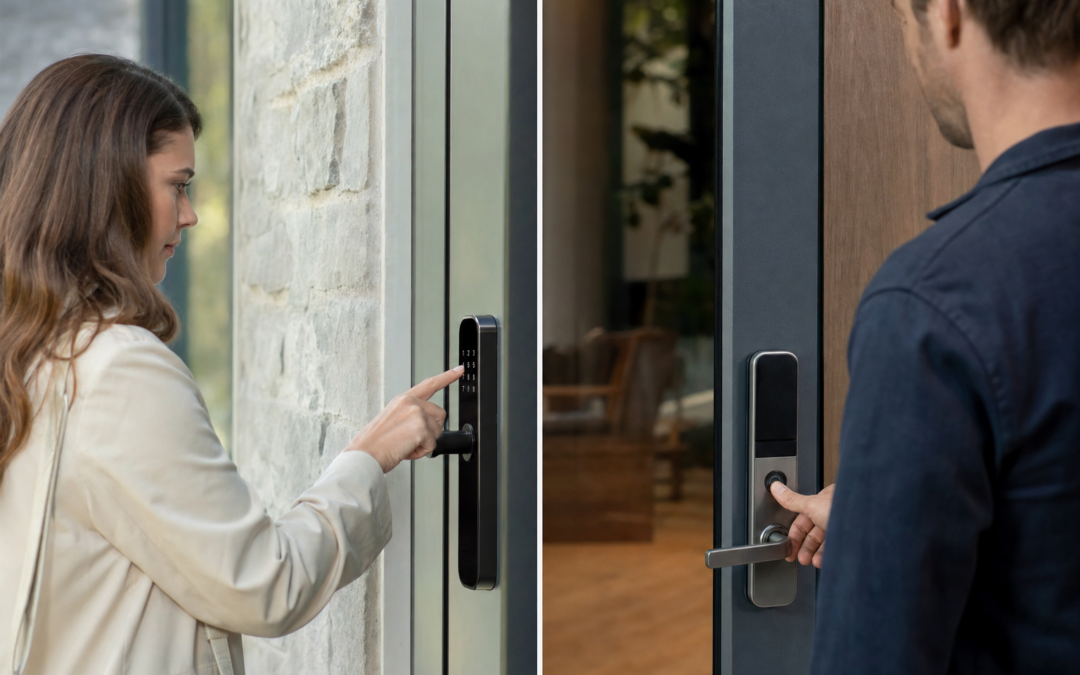
Smart locks are rapidly becoming the centerpiece of modern home security. Two of the most popular options—keypad entry and fingerprint (biometric) locks—promise a blend of convenience and protection. But how do these technologies stack up against each other in real-world reliability? And what tradeoffs should you weigh before installing one on your front door or garage?
In the race between keypad and biometric smart locks, there’s no universal “best” answer. Each method has unique strengths and critical weaknesses, from weather resistance to user error and hacking risk. This guide breaks down the reliability tradeoffs, practical installation tips, and what to expect from each type—so you can make a confident, informed choice for your home’s security needs.
Understanding Smart Lock Technologies
Smart locks have evolved dramatically over the last decade, moving beyond standard key-and-tumbler systems to digital access methods. At a high level, keypad locks require you to enter a PIN code for entry, while biometric locks use your fingerprint to verify your identity. Many modern smart locks also offer app controls, temporary codes for guests, and integration with smart home systems. But the core unlocking mechanism—keypad versus fingerprint—remains the primary factor influencing reliability and day-to-day use.
For a broader overview of alarms, sensors, and smart security options, see our Alarms & Smart Security hub.
Keypad Smart Locks: How They Work
Keypad locks use a numeric pad—either physical buttons or a touchscreen—requiring a user to enter a pre-set code. Some models allow multiple unique codes, letting you assign different PINs to family members, cleaners, or temporary guests. These devices can operate as standalone units or as part of a larger smart home ecosystem, sometimes integrating with apps to monitor usage or change codes remotely.
- Standalone: Only the keypad is needed for access. No app or Wi-Fi required.
- App-Connected: Codes can be changed, and entry logs viewed, from your smartphone.
- Temporary/Guest Codes: Issue a code that only works for a limited time or specific dates.
Keypads are especially popular for garage doors and gates, offering secure access without requiring you to carry a physical key or phone. They’re also valued for their simplicity and reliability, especially in multi-user households.

myQ Smart Garage Door Video Keypad with Wide-Angle Camera Review — CHAMBERLAIN keypads & remotes gear aimed at buyers who want clear specs before they click through. Key figures include 2.71 , 1.34 pounds.
Biometric Fingerprint Smart Locks: How They Work
Biometric locks identify users by scanning their unique fingerprint. Most home-grade models use optical or capacitive sensors to capture and compare a finger’s pattern to those stored in the lock’s memory. Enrollment is typically done through a setup mode, where multiple fingerprints can be registered. Some biometric locks combine fingerprint access with PIN codes or physical keys as backup.
- One-Touch Entry: Unlocks with a single press of your finger—no memorizing codes.
- Multiple Users: Store fingerprints for all family members and trusted visitors.
- Hybrid Models: Offer keypad or key backup in case the sensor fails.
Biometric locks are often marketed as the most secure option, since fingerprints are unique and can’t be easily guessed or shared. However, their real-world reliability can be affected by issues like dirty sensors, worn fingerprints, or adverse weather conditions.
Reliability: Keypad Locks vs. Fingerprint Readers
When it comes to reliability, keypad locks generally have the edge—especially in harsh or variable climates. Here’s what sets them apart:
- Weather Resistance: Physical keypads (especially those with large, tactile buttons) tend to perform well in rain, snow, and extreme temperatures, as long as the electronics are adequately sealed.
- Wear and Tear: Over time, keypads can show wear on commonly used digits, potentially revealing your code to would-be intruders. However, regular code changes and cleaning can mitigate this risk.
- Power Failure: Most keypad locks are battery-powered. Low-battery warnings and emergency key overrides are common features, but dead batteries can still lock you out if ignored.
- User Error: Forgotten PINs or mistyped codes are a common failure point, but typically less problematic than biometric misreads.
Biometric locks, meanwhile, can be finicky:
- Sensor Reliability: Wet, dirty, or injured fingers may not register. Cold weather can make sensors less responsive.
- False Rejection: Frequent for users with worn fingerprints (e.g., manual laborers, elderly individuals).
- Backup Needed: Most models include a keypad or key backup for when the fingerprint reader fails—an acknowledgment of their imperfect reliability.
If reliable, no-fuss access is your top concern (especially for kids or guests), a well-chosen keypad lock is typically the safer bet. But for those who prioritize one-touch convenience and don’t mind a learning curve, fingerprint locks can work well—if you choose a high-quality model and keep a backup entry method available.
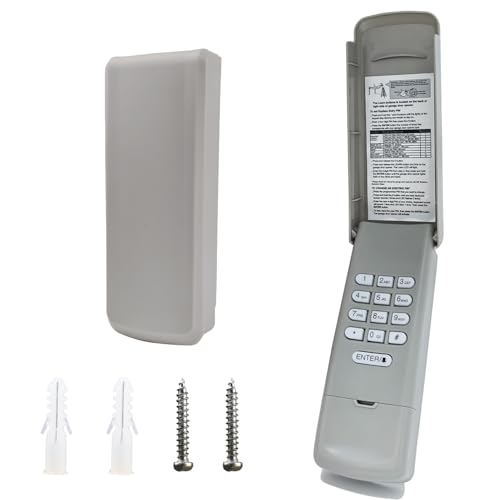
2026 Upgraded Universal Garage Door Opener Keypad for LiftMaster Review — BNRSZ keypads & remotes gear aimed at buyers who want clear specs before they click through. Key figures include 1993, 2.0 , 200.57953.
Security Considerations: Vulnerabilities and Strengths
Security is about more than just keeping the door locked—it’s about how easily a lock can be bypassed, hacked, or tricked. Here’s how keypads and fingerprint locks compare:
Keypad Locks
- Brute Force: Modern locks limit the number of failed attempts before a timeout or lockout, reducing the risk of simple code-guessing attacks.
- Code Sharing: It’s easy to give your code to someone else, which is convenient—but also a risk if codes aren’t updated regularly.
- Wear Patterns: As mentioned, physical wear on keypads can reveal your code’s digits over time. Periodic cleaning and code changes are essential.
- Wireless Hacking: Smart keypad locks with Wi-Fi or Bluetooth connectivity may be vulnerable if not kept updated with security patches. Always change factory default codes and use strong app passwords.
Fingerprint Locks
- Spoofing: High-end sensors are designed to detect fake fingerprints, but cheap models may be fooled by latex or silicone copies.
- Database Security: Fingerprints are stored locally on the device, not in the cloud. This reduces hacking risk, but if the device is stolen, your biometric data could be exposed.
- App Controls: Like keypad locks, biometric models with remote access need secure app passwords and firmware updates.
- Backup Methods: If the fingerprint sensor fails, the lock’s backup system (keypad, manual key) becomes the weak point. Choose a model with robust secondary security.
Neither type is immune to physical attack (e.g., brute-forcing the door itself), but both offer a strong improvement over traditional keyed locks—especially when combined with smart monitoring and alerts.
User Experience: Everyday Use and Accessibility
The best lock is the one you and your family find easy to use. Here’s how the two types stack up in daily scenarios:
- Keypads: Require memorizing and entering a code. Good for people who dislike carrying keys or phones. Can be harder for children or elderly users who struggle with memory or dexterity.
- Biometric Locks: Offer true “hands-free” convenience—no need to dig for keys or recall a code. However, children’s fingerprints may change, and those with certain disabilities or worn skin may experience frequent false rejections.
- Gloved Hands: Keypads can be used with gloves (for physical buttons), while fingerprint readers typically cannot—an important consideration in colder climates.
- Guest Access: Keypads allow you to issue temporary codes, while fingerprint locks require enrolling a print—less convenient for one-time visitors or service workers.
In short, keypad locks tend to offer broader accessibility and flexibility for most households, while fingerprint locks shine for those who value the ultimate in personal convenience and don’t mind occasional hiccups.
Installation and Maintenance: What to Expect
Most modern smart locks, whether keypad or biometric, are designed for DIY installation with basic tools. Here’s what to consider:
- Retrofit vs. Full Replacement: Some locks replace your existing deadbolt entirely, while others retrofit onto the inside of your door. Make sure the model you choose is compatible with your door’s thickness and backset.
- Power Source: Both types are usually battery-operated. Plan to replace batteries every 6-12 months, depending on usage. Some keypad models use 9V backup terminals for emergency power.
- Weatherproofing: If installing outdoors (e.g., on a gate or garage), choose a model rated for the elements. Look for IP ratings and user reviews regarding durability.
- Maintenance: Keypads may require periodic cleaning to prevent stuck buttons or visible wear. Fingerprint sensors need to be kept clean and dry for optimal performance.
- Firmware Updates: For app-connected locks, periodically check for firmware updates to patch security vulnerabilities.
Professional installation is rarely required, but may be wise for high-security applications or if you’re integrating the lock with an advanced home automation system.

Chamberlain Genuine Universal myQ Wireless Garage Door Keypad Review — A CHAMBERLAIN pick in Keypads & Remotes that focuses on real-world usability Key figures include 1993 , 1.24 , 1.
Cost and Value: What Are You Paying For?
Smart lock prices vary widely, but here are some typical trends:
- Keypad Locks: Basic models start under $50, while advanced Wi-Fi or app-connected units can reach $200 or more. The price is driven by build quality, connectivity, and brand reputation.
- Fingerprint Locks: Entry-level models start around $80-$100, with high-end hybrid locks (that combine keypad, fingerprint, and app controls) costing $200-$300+. More expensive models tend to have better sensors and weatherproofing.
It’s worth noting that a higher price doesn’t always guarantee greater reliability; read reviews and look for locks with robust warranties and responsive customer support. Also consider the long-term value of features like guest codes, remote monitoring, and integration with your broader smart home system.
Hybrid Smart Locks: The Best of Both Worlds?
Many manufacturers now offer hybrid models that combine keypad and fingerprint access. These locks let each user choose their preferred method, and provide redundancy in case one system fails. For example, if the fingerprint sensor rejects you, you can simply enter your PIN code instead—or vice versa.
- Redundancy: Reduces the risk of lockouts from battery failure, dirty sensors, or forgotten codes.
- Flexible Access: Useful for large families or homes with regular guests or service workers.
- Complexity: More features can mean more potential points of failure. Make sure to keep backup methods secure and up-to-date.
If you’re torn between keypad and biometric options, a hybrid lock offers a practical compromise—provided you’re willing to pay a premium for the flexibility.
Garage and Gate Applications: Special Considerations
Keypad and biometric locks aren’t just for front doors—many homeowners install them on garage doors, gates, or outbuildings for added convenience and security. In these scenarios, reliability and weather resistance become even more critical. Outdoor keypads are generally favored for these applications, since fingerprint sensors can struggle with exposure to rain, dust, or extreme temperatures.
Some popular garage door keypads, such as those from Chamberlain and LiftMaster, are engineered specifically for outdoor use and can be programmed with multiple codes for family and guests. For a closer look at standout options, see our reviews of the latest models.

Garage Door Opener Keypad for Liftmaster/Chamberlain/Craftsman Openers Review — Practical keypads & remotes from JUSTHILLUP, summarized from hub features and listed measurements. Key figures include 1993 , 200.57933 , 3 .
Best Practices for Maximizing Reliability and Security
Whichever lock type you choose, following these best practices will help you get the most reliable performance and security:
- Change Codes Regularly: For keypads, update your PIN every few months and after any guest access.
- Enroll Multiple Fingers: For biometric locks, register multiple fingers from each user to reduce false rejections.
- Keep Surfaces Clean: Wipe down keypads and sensors regularly to prevent buildup and wear patterns.
- Monitor Battery Levels: Replace batteries promptly when warned, and keep backup keys or codes secure but accessible.
- Update Firmware: For smart models, accept firmware updates promptly to patch security holes.
- Use Strong App Credentials: Always use unique, strong passwords for any associated app or cloud service.
- Test in All Conditions: Try unlocking your door with gloves, in the rain, or in extreme cold to ensure your chosen lock performs as expected.
These small habits make a big difference in both the day-to-day reliability and long-term security of your smart lock system.
Who Should Choose a Keypad Lock?
Keypad locks are an excellent fit for:
- Homes with children, elderly, or frequent guests who may struggle with biometric sensors
- Outdoor installations (garages, gates) where weather could impact sensor reliability
- Users who prefer simplicity and broad accessibility
- Anyone who wants to issue temporary access codes for cleaners, pet sitters, or contractors
If you value reliability, low-tech backup, and flexibility, keypads remain the gold standard—especially for high-traffic entry points.
Who Should Consider a Fingerprint Lock?
Fingerprint locks are ideal for:
- Tech-forward users who want quick, key-free entry
- Small households where all users have reliable fingerprints (and are comfortable with technology)
- Interior doors where weather isn’t a concern
- Anyone who dislikes memorizing codes or carrying keys/phones
Biometric locks can add a “wow” factor to your home and are highly convenient—just be sure to have a backup plan for those times when technology doesn’t cooperate.
Making Your Choice: Key Takeaways
Both keypad and fingerprint smart locks offer significant security and convenience upgrades over traditional keyed locks. The right choice depends on your household’s needs, local climate, and your tolerance for occasional glitches or extra steps.
- For reliability and flexibility, especially in outdoor or multi-user scenarios, keypad locks are hard to beat.
- For ultimate convenience and a modern touch, fingerprint locks are appealing, but require careful model selection and backup planning.
- Hybrid models offer the best of both worlds—at a higher price and with added complexity.
Before buying, consider how you’ll use the lock day-to-day, who will need access, and what conditions the lock will face. Investing a bit of extra thought now can save you frustration—and keep your home secure—for years to come.
For more smart home security advice and up-to-date product picks, explore our Alarms & Smart Security hub at Home Defense Tips.
Checklist: Choosing the Right Smart Lock for Your Needs
- Climate Suitability: Does the lock operate reliably in your local weather conditions (extreme cold, heat, rain, or humidity)?
- Number of Users: Do you need to grant access to multiple family members, guests, or service providers?
- Backup Entry Options: Does the lock offer alternative entry methods (physical key, app, or backup codes) in case the primary method fails?
- Integration: Will the lock work with your existing smart home system (Alexa, Google Home, Apple HomeKit)?
- Ease of Use: Are all household members comfortable with the technology, or would a simpler interface be better?
- Security Features: Does the lock support features like auto-lock, tamper alarms, or two-factor authentication?
- Power Source: How often do you need to change batteries, and is there an emergency power or charging option?
- Installation Requirements: Can you install the lock yourself, or will you need professional help or door modifications?
Common Mistakes to Avoid When Using Smart Locks
- Reusing PIN Codes: Avoid using simple or repeated codes (like 1234 or your birth year) that are easy to guess.
- Neglecting Regular Maintenance: Failing to clean keypads or fingerprint sensors can lead to malfunctions and lockouts.
- Ignoring Firmware Updates: Not updating your lock’s firmware may expose you to security vulnerabilities and compatibility issues.
- Overlooking Battery Life: Waiting until the battery is completely dead before replacing it can leave you locked out.
- Storing Backup Keys Unsafely: Hiding physical backup keys in obvious places (like under the doormat) defeats the purpose of smart security.
- Not Registering Multiple Fingerprints: For biometric locks, only enrolling one finger (or just one user) increases the risk of access problems if that finger is injured or dirty.
- Sharing PINs Too Widely: Giving out your access code to too many people increases the risk of a security breach. Use temporary codes where possible.
Maintenance Tips for Smart Lock Longevity
- Clean Regularly: Wipe down keypads and fingerprint sensors with a soft, damp cloth to prevent buildup of grime, which can interfere with input and scanning.
- Check Battery Status: Many smart locks have low-battery alerts—don’t ignore them. Keep spare batteries on hand and replace them at least once a year, or more often in cold climates.
- Update Firmware: Regularly check the manufacturer’s app or website for firmware updates that patch security holes and improve reliability.
- Inspect for Wear: Periodically examine the keypad for worn buttons or the fingerprint reader for scratches. Replace parts if necessary.
- Test Backup Methods: Occasionally test physical keys, app access, or backup codes to ensure they work in case of emergency.
- Protect from Weather: Install a weather shield or choose locks rated for outdoor use if exposed to rain, snow, or direct sunlight.
- Re-enroll Fingerprints: If anyone has trouble with biometric access, try re-registering their fingerprints for improved accuracy.
Frequently Asked Questions About Smart Lock Keypads and Fingerprints
Can smart locks be hacked?
Like any digital device, smart locks are not immune to hacking attempts. However, most reputable brands use strong encryption and regular firmware updates to minimize risks. Always keep your lock’s software up to date, use complex PINs, and enable multi-factor authentication if available.
What happens if the power or batteries die?
Most smart locks are battery-powered and will provide low-battery warnings before shutting down. Many also include a backup entry method, such as a physical key or an emergency charging port. For app-connected locks, loss of Wi-Fi or Bluetooth won’t usually affect keypad or fingerprint entry, but may prevent remote access features.
Do fingerprint locks work for all users?
Fingerprint sensors may struggle with very young children, seniors with worn fingerprints, or anyone with cuts, dirt, or moisture on their fingers. Always register multiple fingers per user and consider a hybrid model with keypad or key backup for households with diverse needs.
How can I improve the security of my smart lock?
- Change PIN codes regularly and avoid sharing them unnecessarily.
- Limit the number of registered fingerprints to trusted individuals.
- Enable tamper alerts and notification features via your smart home app.
- Install the lock according to manufacturer guidelines and use all available security features.
Are smart locks a good choice for rental properties?
Yes, smart locks—especially keypad models—are popular for rentals and Airbnb properties. They let you issue time-limited codes to guests and change access remotely, improving convenience and security compared to traditional keys. Just be sure to reset or delete codes between tenants.
Our content is researched and drafted with AI assistance and reviewed by our team. Product details come from published specs, manufacturer information and owner reviews.