
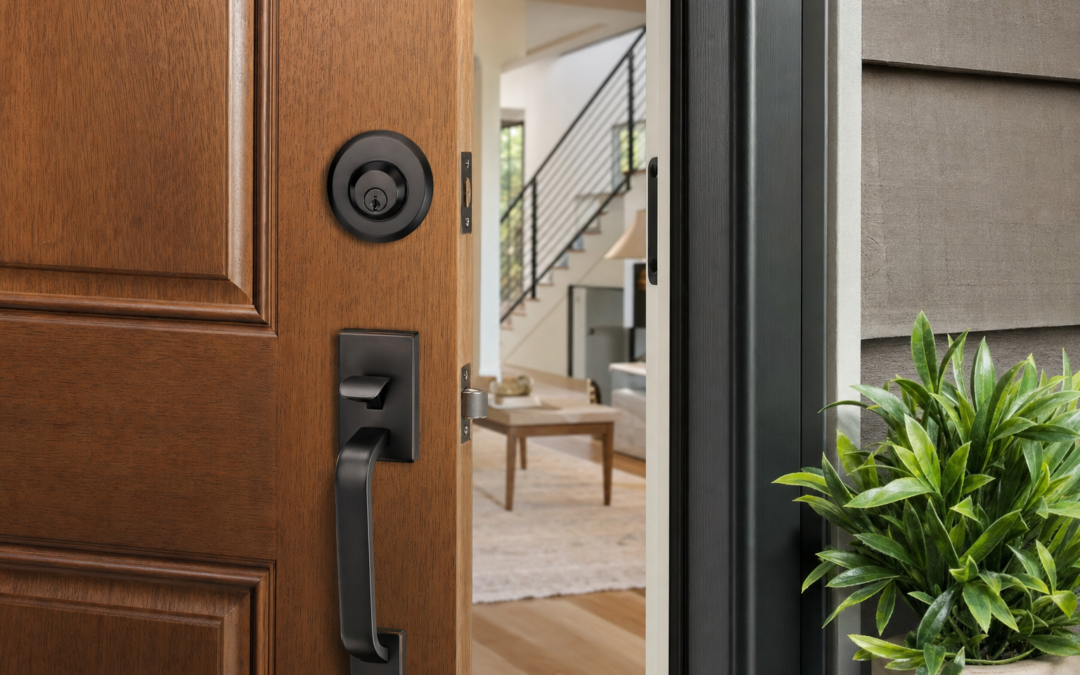
Deadbolts are the backbone of most home entry protection strategies. Whether you’re upgrading an old lock, building a new house, or considering smart home features, understanding the differences between deadbolt grades, strike plates, and smart lock technology is essential for making a choice that actually improves your security—not just your peace of mind.
In this practical guide, we’ll break down the most important factors in choosing a deadbolt for your home, from ANSI/BHMA grading to strike plate installation and the pros and cons of smart locks. We’ll also point you to detailed product reviews and our entry protection hub for more hands-on guidance and recommendations.
What Makes a Deadbolt Secure?
Deadbolts are specifically designed to resist forced entry, unlike spring-latch locks that can be easily “loided” (slipped open with a credit card). The security of any deadbolt depends on a mix of factors: the lock’s construction quality, how it’s installed, the strength of the strike plate, and the grade assigned by independent testing organizations. Let’s break down each element.
Understanding Deadbolt Grades: ANSI/BHMA Ratings
Deadbolts are graded by the American National Standards Institute (ANSI) and the Builders Hardware Manufacturers Association (BHMA). These grades—Grade 1, Grade 2, and Grade 3—reflect how well a lock stands up to brute-force attacks, lock picking, and wear over time.
- Grade 1: The highest rating. These locks withstand 10 strikes of 75 pounds of force and 250,000 open/close cycles. They’re recommended for exterior doors.
- Grade 2: Good for exterior and interior doors. Handles 5 strikes of 75 pounds and 150,000 cycles.
- Grade 3: Minimum residential grade. Meets basic requirements but offers less resistance to forced entry.
When shopping, look for Grade 1 deadbolts for main entry doors, garage entry doors, and any other exterior access points. Grade 2 is acceptable for secondary entrances. Avoid Grade 3 on exterior doors if at all possible.
Single vs. Double Cylinder Deadbolts
Single cylinder deadbolts are the most common in the US. They use a key on the outside and a thumbturn on the inside. Double cylinder deadbolts require a key on both sides. Which is safer?
- Single cylinder: Easier and faster to operate in emergencies (e.g., fire exit). However, if there’s glass near the lock, a burglar could break it and reach inside to unlock.
- Double cylinder: More secure for doors with nearby windows or glass panels. However, they can pose a safety risk if you can’t find the key quickly in an emergency.
Our advice: Use double cylinder deadbolts only when absolutely necessary, and always keep a key nearby but out of arm’s reach of any windows.
The Importance of Strike Plates and Screws
The strike plate is the metal piece installed on the door frame where the deadbolt slides in. It’s a small component, but it plays a huge role in resisting kick-ins and forced entries. Even the best deadbolt can be defeated if the strike plate is weak or poorly installed.
- Always use a reinforced strike plate that includes extra-long screws (at least 3 inches) so they reach the wall stud behind the door frame.
- Many standard deadbolts come with short screws (less than 1 inch) that only anchor into the soft door jamb, not the stud.
- Upgrade your strike plate if you’re not sure—this is a low-cost, high-impact improvement for any home.
Smart Deadbolts: Pros, Cons, and Must-Have Features
Smart locks have become increasingly popular for their convenience features—keyless entry, remote access, guest codes, and integration with smart home systems. But do they compromise on security compared to traditional deadbolts?
- Strength: The best smart deadbolts are built on top of ANSI Grade 1 or 2 hardware. Check the grading before you buy.
- Connectivity: WiFi and Bluetooth features are convenient, but be aware of potential cyber vulnerabilities. Always update firmware and use strong passwords.
- Power: Most smart locks are battery-powered. Choose a lock with a low-battery warning and a backup entry method (like a physical key or emergency charging port).

Veise VE027-K WiFi Smart Deadbolt Locks with 2 Knobs Set Review — Veise deadbolts gear aimed at buyers who want clear specs before they click through. Key figures include 2, 0, 100.
For a closer look at top-rated smart deadbolts, see our hands-on reviews. The Veise VE027-K WiFi Smart Deadbolt is one of our entry picks for buyers who want a balance of security, convenience, and clear technical specs.
Key Control: Why Rekeying and Master Keys Matter
Physical key security is sometimes overlooked. If your lock uses a common keyway or has been rekeyed multiple times, the chances of an unauthorized copy increase. Here’s what you should know:
- Rekeyable deadbolts let you change the key that operates the lock without replacing the hardware. This is useful after moving into a new home or a lost/stolen key incident.
- Some brands offer master key systems, which let you use one key for multiple locks. This can be convenient, but be cautious: a lost master key means all those locks are at risk and should be rekeyed immediately.
- Consider high-security keyways, which are more difficult to copy at local hardware stores.
Installation Tips: Getting the Most Out of Your Deadbolt
Even the highest-rated deadbolt can be compromised by poor installation. Here’s what to focus on for a secure fit:
- Bore hole size: Most residential deadbolts require a 2 1/8-inch hole. If your door has a smaller hole, you may need an adapter or may have to widen it.
- Backset: This is the distance from the edge of the door to the center of the bore hole (usually 2 3/8″ or 2 3/4″). Make sure your lock matches your door’s setup.
- Alignment: The bolt must slide smoothly into the strike plate. If it rubs or jams, adjust the plate or mortise for a snug, secure fit.
- Reinforcement: As above, always use long screws for both the strike plate and the lock’s mounting plate.
If you’re not comfortable with power tools or door drilling, consider professional installation, especially for smart locks with electronics.
Smart Lock Security: What to Look For
Smart deadbolts can offer both increased convenience and additional attack surfaces. When evaluating smart locks for security, keep these points in mind:
- Lock body construction: Look for solid metal housings and ANSI rating details in the product specs.
- Authentication: Multi-factor options (such as PIN + key, or app + fingerprint) add layers of safety.
- Auto-locking: Many smart locks offer auto-lock timers, which help if you forget to lock up when leaving.
- Audit trails: Some models log entry times and user codes, so you can track who entered and when.

eufy Security Smart Lock C220 Review — An editorial look at this eufy Security option for deadbolts — specs first, marketing second. Key figures include 6 , 8 , 7.67 .
For example, the eufy Security Smart Lock C220 is a feature-packed deadbolt with a strong editorial focus on real-world specs and usability. Read our full review to see if it fits your home’s needs.
Reinforcing Your Door: Beyond the Deadbolt
A deadbolt is only as strong as the door and frame around it. To truly secure your entryway, consider these additional steps:
- Door material: Solid wood or reinforced metal doors are far more resistant to forced entry than hollow-core doors.
- Hinge security: Use security hinges with non-removable pins, especially if your door swings outward.
- Door edge reinforcement: Metal wrap-around plates reinforce the area where the deadbolt is installed, making kick-ins less effective.
- Supplemental locks: Add an extra layer with surface-mounted latches or door reinforcement locks.

Door Lock for Front Door Kids Safety Home Security Door Reinforcement Locks Review — WINONLY latches & bolts gear aimed at buyers who want clear specs before they click through. Key figures include 3, 8 , 5 minutes.
Products like the WINONLY Door Lock for Front Door are designed for quick installation and can add up to 800 lbs of force resistance. These are especially useful for families with kids or for high-risk entry points.
Common Deadbolt Weaknesses (And How to Fix Them)
No lock is invincible, but most burglaries exploit a handful of common weaknesses. Here’s what to watch for—and how to fix it:
- Short screws in strike plates: Replace with 3-inch screws to anchor into the framing stud.
- Poorly fitting doors: If your door has large gaps or is misaligned, even a strong deadbolt won’t engage fully. Adjust or weather-strip for a snug fit.
- Glass within arm’s reach: Use double cylinder deadbolts or add security film to glass to resist break-ins.
- Old or worn locks: If the key sticks, the lock wobbles, or the bolt doesn’t fully extend, replace the deadbolt immediately.

Door Reinforcement Lock Door Locks for Kids Safety Home Security Review — A WINONLY pick in Latches & Bolts that focuses on real-world usability Key figures include 800 lbs, 12, 8 .
For more on practical entry protection upgrades, including latches and bolts, check out our hands-on reviews and guides from the Entry Protection hub.
Comparing Popular Deadbolt Brands
Several brands consistently perform well in independent tests and real-world use. Here’s a quick rundown of what to expect from the most common names:
- Schlage: Known for robust Grade 1 and 2 deadbolts, wide availability, and key control options. Popular for both traditional and smart lock lines.
- Kwikset: Offers rekeyable deadbolts and a range of smart lock options. Some models use “SmartKey” technology, which is convenient but has faced security criticisms in the past.
- Yale: A leader in smart lock technology, with models compatible with Z-Wave, Zigbee, and WiFi systems. Good for smart home integration.
- August: Focused on retrofit smart locks that work with existing deadbolts. Good for renters or those who don’t want to replace the whole lock.
- Veise, eufy, and WINONLY: These emerging brands offer well-reviewed options for both traditional and smart deadbolts, often at competitive prices. Check product-specific reviews for real-world performance.
Deadbolt Maintenance and Longevity
Even the best deadbolt needs periodic maintenance to keep it functioning smoothly and securely. Here’s how to get the most life and reliability out of your locks:
- Lubrication: Use graphite or a lock-specific lubricant (never WD-40) on the keyway and bolt once or twice a year.
- Tighten screws: Every few months, check the mounting screws on the lock and strike plate to ensure nothing has come loose with use or seasonal changes.
- Check battery life: For smart locks, replace batteries as soon as you receive a low-battery warning. Keep backup batteries or a physical key accessible.
- Test operation: Regularly lock and unlock your deadbolt from both sides to catch sticking or misalignment issues early.
When Should You Replace Your Deadbolt?
Most deadbolts last 7–10 years with normal use, but you should consider replacing your deadbolt sooner if:
- The lock feels loose, wobbly, or doesn’t fully engage.
- The key sticks or won’t turn smoothly, even after lubrication.
- Your home has been broken into, or you suspect someone has an unauthorized key copy.
- You want to upgrade to a smart lock or need better key control features.
- The lock is Grade 3 and used on an exterior door.
Upgrading to a new, higher-grade deadbolt is one of the most cost-effective ways to boost your home’s security.
Final Thoughts: Building a Layered Entry Defense
No single deadbolt can make a home burglar-proof, but choosing the right lock—and installing it correctly—makes break-ins much harder. Combine a high-grade deadbolt with reinforced strike plates, a solid door, and, where appropriate, a smart lock with secure connectivity. For most US homes, this combination is enough to deter opportunistic burglars and buy time for law enforcement or neighbors to respond in the event of an attempted entry.
For more in-depth reviews, installation guides, and entry protection strategies, visit our Entry Protection hub. Stay safe and secure, and remember: a strong deadbolt is just the start of a truly secure home.
Deadbolt Installation Checklist
Installing a deadbolt properly is just as important as choosing a quality lock. Use this checklist to ensure your new deadbolt provides maximum security:
- Choose the right grade: Confirm you’re using at least an ANSI Grade 1 or 2 deadbolt for all exterior doors.
- Correct backset: Measure your door’s backset (the distance from the edge of the door to the center of the borehole—usually 2-3/8″ or 2-3/4″) and select a deadbolt that fits.
- Reinforced strike plate: Replace standard strike plates with reinforced models and use 3″ screws to anchor them into the wall stud.
- Proper alignment: Ensure the deadbolt extends fully into the strike plate hole without friction or sticking.
- Test operation: Lock and unlock from both sides several times to confirm smooth operation.
- Weatherstripping: Add or adjust weatherstripping if the door is loose, but make sure it doesn’t interfere with the deadbolt’s movement.
- Smart lock setup: For smart deadbolts, follow all manufacturer instructions for pairing, app installation, and updating firmware.
Common Deadbolt Mistakes to Avoid
Even the best deadbolt can be compromised by simple errors in selection or installation. Watch out for these common mistakes:
- Using short screws: Many people install strike plates with the screws provided—often less than 1″ long. Always upgrade to 3″ screws that reach the wall stud.
- Overlooking the door frame: A weak or damaged door frame can render any deadbolt useless. Reinforce or repair frames as needed.
- Forgetting the hinges: If your door swings outward, exposed hinges can be a security risk. Use security hinges with non-removable pins.
- Neglecting glass panels: Installing a single cylinder deadbolt near glass allows burglars to break the glass and reach inside. Use double cylinder deadbolts or security film on glass.
- Ignoring regular maintenance: Failing to lubricate or check the deadbolt can lead to jams or failures just when you need it most.
- Not updating smart locks: Outdated firmware on smart locks may expose you to hacking risks. Enable automatic updates or check regularly for software patches.
Deadbolt Maintenance: How to Keep Your Locks Secure
Deadbolts are designed to last for years, but they do require occasional maintenance to keep them functioning smoothly and securely. Here’s how to care for your locks:
- Lubricate annually: Use a graphite or Teflon-based lubricant (not oil) in the keyway and moving parts to prevent sticking and wear.
- Check for loose screws: Periodically tighten all screws on the deadbolt and strike plate. Loose hardware reduces both security and reliability.
- Inspect for wear: Look for signs of rust, corrosion, or damage to the bolt, cylinder, or key. Replace any worn or compromised components promptly.
- Smart lock battery checks: For electronic deadbolts, check battery levels monthly and replace batteries as soon as you receive a low-battery warning.
- Test operation: Lock and unlock the deadbolt from both sides at least once a month to ensure smooth movement and proper alignment.
Regular maintenance can extend the life of your deadbolt and help you spot vulnerabilities before they become a security risk.
Deadbolt Security FAQ
Can I install a deadbolt myself, or do I need a locksmith?
Most homeowners can install a deadbolt with basic tools (drill, screwdriver, chisel). However, if your door doesn’t already have a deadbolt hole, or if you’re unsure about alignment and security, hiring a professional locksmith is a good idea. Proper installation is critical for security.
How often should I replace my deadbolt?
Deadbolts can last 7–10 years or longer with proper maintenance. Replace your deadbolt if it shows signs of rust, sticking, or mechanical failure—or if you move into a new home and are unsure who else has keys.
Are smart deadbolts as secure as traditional ones?
Smart deadbolts can be just as secure as traditional deadbolts if they use Grade 1 or 2 hardware and are properly installed. However, they introduce potential cyber risks, so always update firmware, use strong passwords, and enable two-factor authentication if available.
What should I do if my deadbolt is hard to turn?
If your deadbolt is stiff or difficult to operate, first try lubricating the keyway and bolt with a graphite or Teflon-based spray. If the problem persists, check for misalignment between the bolt and strike plate, or for a warped door. Persistently stuck locks should be replaced.
Does adding a deadbolt really improve security?
Yes, a quality deadbolt—properly installed with a reinforced strike plate—significantly improves your home’s resistance to forced entry compared to standard knob locks alone. It’s one of the simplest and most effective upgrades for home security.
Quick Tips for Maximizing Deadbolt Effectiveness
- Always lock your deadbolt, even when you’re at home.
- Consider adding a door reinforcement kit for high-risk areas.
- Don’t hide spare keys outside—use a secure lockbox if needed.
- Register your smart deadbolt with the manufacturer for warranty and update notifications.
- Teach all household members how to operate and maintain the locks.
By following these tips and guidelines, you’ll make sure your deadbolt is more than just a deterrent—it’s a real barrier against intruders.