
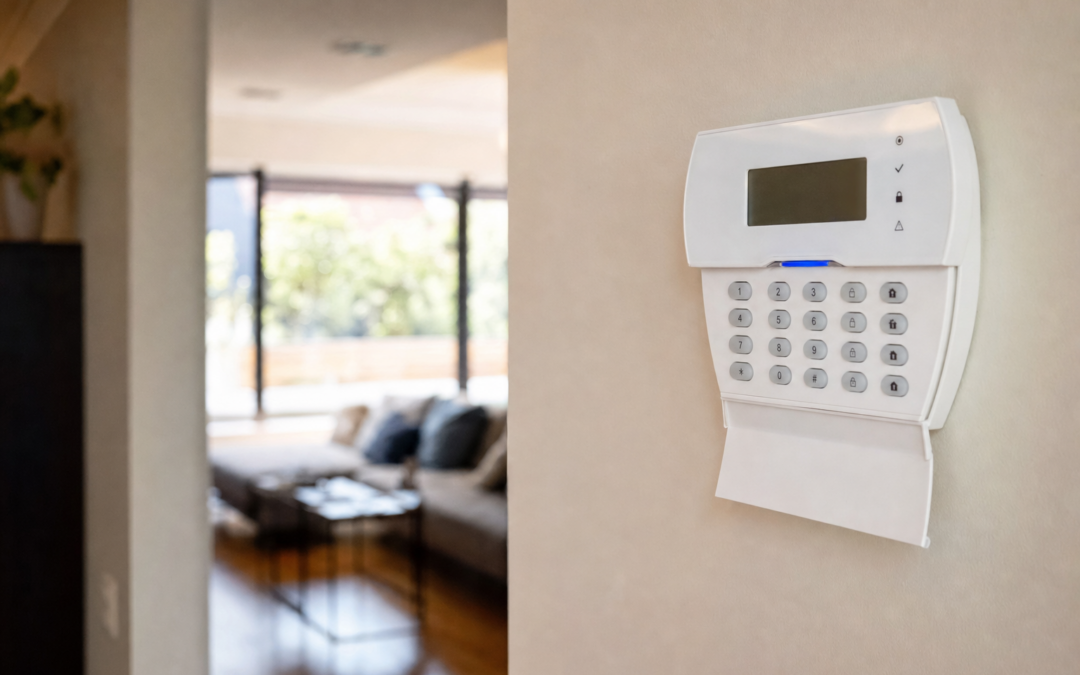
When it comes to protecting your home, alarm systems are only as dependable as their power sources. A sudden power outage can leave your home vulnerable unless your alarm panel and key sensors are properly equipped with battery backups or uninterruptible power supplies (UPS). Understanding how to keep your security system running through blackouts is crucial for reliable, round-the-clock protection.
Whether you live in an area prone to storms, have a history of power interruptions, or simply want peace of mind, knowing how your alarm system handles outages is essential. This guide will walk you through alarm panel battery backups, sensor power, UPS solutions, and maintenance tips for uninterrupted security coverage.
Why Alarm Power Backups Matter
Most modern home alarm systems are designed to be active at all times, monitoring for break-ins, smoke, fire, and other hazards. But these devices are typically powered by your home’s main electricity. If the power goes out, your system could lose its ability to alert you and emergency responders—unless it has a reliable backup in place.
- Burglary risk: Criminals sometimes cut power intentionally. A powerless alarm is a useless alarm.
- Natural disasters: Storms and weather events are a leading cause of outages, often when you need security the most.
- Fire and smoke detection: Hardwired smoke alarms also rely on power—if they fail during an outage, you may not receive critical warnings.
By investing in battery backups and UPS solutions, you ensure your alarm system remains operational even when your lights are out. For an overview of security categories and guidance, visit our Alarms & Smart Security hub.
How Home Alarm Systems Get Their Power
To understand backup options, it’s important to know how home alarm systems and sensors are typically powered. Here’s a breakdown:
- Alarm panels: The “brain” of the system. Most are plugged into a standard outlet and have a built-in rechargeable battery for backup.
- Keypads: Wall-mounted or wireless, these may draw power from the panel or have their own batteries.
- Door/window sensors: Usually battery-operated, with lifespans of 1–3 years depending on usage and model.
- Glass break and motion sensors: Can be hardwired or battery-powered; check your model for specifics.
- Smoke and CO detectors: Some are hardwired with battery backup, others are purely battery-powered.

Ring Sensors: Glass Break Sensor (newest model) Review — Practical categories from Ring, summarized from hub features and listed measurements. Key figures include 2 , 53, 2.
How Long Will My Alarm Work in a Power Outage?
The duration your alarm system will function during a power outage depends on the type and condition of its backup battery (or UPS, if used):
- Standard alarm panel battery: Typically lasts 4–24 hours after losing AC power. The actual time depends on battery size, age, and the number of devices connected.
- UPS for alarm panel: Can extend runtime from a few hours to several days, depending on UPS battery capacity.
- Individual sensor batteries: Most sensors (door, window, glass break) continue to operate as long as their internal batteries are good—usually months or years between replacements.
- Hardwired smoke alarms with battery backup: These will continue functioning on battery power as long as the battery is fresh.
It’s important to test and replace backup batteries regularly to ensure maximum coverage during an outage.
Types of Battery Backups for Alarm Panels
Most modern alarm panels come with an internal backup battery. Here’s what you need to know:
- Sealed lead-acid (SLA) batteries: The most common type in traditional panels. They’re rechargeable, last 3–5 years, and are easy to replace.
- Lithium-ion batteries: Increasingly common in smart alarm hubs. These are lighter, more compact, and often last longer between replacements.
Check your alarm panel’s manual for battery type, location, and replacement instructions. If your system is older, the backup battery may need more frequent checks.
Using a UPS (Uninterruptible Power Supply) for Alarm Panels
If you want to extend your alarm system’s runtime during a blackout, consider plugging the main panel into a UPS. This device acts as a secondary power source, instantly switching to battery when grid power fails.
- UPS advantages: Provides “clean” power, protects against surges, and can keep your alarm running for hours or even days (depending on UPS size and power draw).
- UPS selection: Choose a UPS with enough capacity for your alarm panel and any connected devices (keypad, router, etc.). For most home alarms, a compact UPS rated at 350–600VA is sufficient.
- Installation: Plug the alarm panel’s transformer into the UPS, then plug the UPS into your wall outlet. Test regularly to ensure seamless switching.
Remember, a UPS only backs up devices plugged into it. Battery-powered sensors and smoke detectors are not affected by the UPS directly, but a UPS can also support your Wi-Fi router for smart alarms that rely on internet connectivity.
Powering Smoke and CO Detectors During Outages
Smoke and carbon monoxide (CO) alarms are critical for safety, especially during an outage when you may use candles, generators, or other risky equipment. There are two main types:
- Battery-only smoke/CO detectors: Independent from house power, these will work during outages as long as batteries are fresh.
- Hardwired detectors with battery backup: These use house power but switch to a backup battery when needed. The battery must be checked and replaced as needed.

First Alert BRK SMI100-AC Hardwired Smoke Detector with Battery Backup Review — An editorial look at this First Alert option for smoke detectors & fire alarms — specs first, marketing second. Key figures include 6 pack, 120, 9.
Never ignore low battery chirps from smoke or CO alarms—replace batteries immediately to ensure protection during blackouts.
How to Test and Replace Alarm Panel Backup Batteries
Regular maintenance is essential for your alarm’s reliability. Follow these steps to keep your backup battery in top condition:
- Test monthly: Most panels have a “test” button or feature in the app. This will simulate a power failure and check if the battery takes over.
- Inspect yearly: Open the panel and visually inspect the battery for swelling, corrosion, or leaks.
- Replace every 3–5 years: Even if it’s not visibly worn, batteries lose capacity over time. Mark the install date and plan regular replacements.
- Dispose of properly: Follow local guidelines for battery disposal—never throw lead-acid or lithium batteries in the trash.
If your alarm panel reports trouble codes or chirps, check the manual for battery warning indicators.
What About Wireless and Smart Alarms?
Many new alarm systems, including DIY and smart home products, rely on wireless communication and battery-powered sensors. Here’s what to know:
- Battery-powered sensors: These continue to work as long as their internal batteries have charge, regardless of house power or internet.
- Smart alarm hubs: Usually have a built-in backup battery. If the hub loses power, it will still communicate with sensors and may use cellular backup if Wi-Fi/internet is down.
- Internet and notifications: For smart alarms, a UPS can keep your modem and router running, ensuring alerts still reach your phone or monitoring service.
Always check the battery status indicators in your app or on the device, and schedule regular battery replacements for all wireless sensors.

Kidde Compact Smoke Detector, AA Battery-Powered, 10SDR Review — Practical smoke detectors & fire alarms from Kidde, summarized from hub features and listed measurements. Key figures include 25, 85, 10.
How to Choose the Right Backup Solution for Your Setup
Every home and alarm system is a little different. Here are some practical tips for choosing the right backup configuration:
- For traditional, hardwired alarm panels: Maintain the internal backup battery and consider adding a UPS for extended outages.
- For smart/wireless alarm systems: Ensure the main hub has a working backup battery, and keep batteries fresh in all sensors.
- For smoke and CO alarms: If you have hardwired models, test the battery backup regularly. If battery-only, replace batteries annually or as indicated by the manufacturer.
- For rural or outage-prone areas: Consider a larger UPS or a secondary backup battery for the alarm panel to ensure multi-day coverage.
- For critical monitoring (medical, elderly, etc.): Redundant backups (UPS plus panel battery) may be warranted for peace of mind.
Signs Your Alarm Backup Battery Needs Replacing
Don’t wait for a blackout to discover your backup battery is dead. Look for these warning signs:
- Alarm panel beeps or displays a “low battery” warning
- Shortened backup duration during test (less than 4 hours)
- Visible swelling, leakage, or corrosion on the battery
- Battery is more than 3–5 years old
If you see any of these signs, replace the battery as soon as possible. Consult your system manual for model and installation instructions.
Frequently Asked Questions About Alarm Power Backups
- Will my alarm still call emergency services during a power outage?
Yes—if the panel’s backup battery (and, for smart alarms, your internet or cellular connection) is working properly. That’s why battery and UPS maintenance is essential. - Can I use rechargeable batteries in my sensors?
Only if the manufacturer allows it. Some sensors require single-use lithium or alkaline batteries for proper voltage and reliability. - How do I test my alarm system during a power outage?
Most panels have a “test” mode that simulates a power failure. You can also unplug the panel (if safe) to check battery function—alerts and beeps should continue as normal. - Do I need a UPS if my alarm panel already has a backup battery?
Not always, but a UPS provides longer runtime and surge protection. It’s especially useful in areas with frequent or extended outages.
Practical Steps to Prepare for Power Outages
Here’s a quick checklist to ensure your home alarm system is ready for the next power outage:
- Test your alarm panel’s battery backup monthly
- Replace panel batteries every 3–5 years (or sooner if indicated)
- Check and replace sensor/smoke alarm batteries as recommended
- Consider a UPS for your alarm panel and Wi-Fi router
- Keep spare batteries on hand for critical sensors
- Read your alarm system manual for specific power backup instructions

First Alert Battery Smoke Alarm Review — Practical smoke detectors & fire alarms from First Alert, summarized from hub features and listed measurements. Key figures include 3, 5.6 , 0.6 pounds.
Conclusion: Consistent Security Through Any Outage
No matter how advanced your home alarm system is, it’s only as effective as its power backup. Whether you opt for a traditional panel with a fresh battery, a smart alarm hub with cellular failover, or a full UPS setup, regular testing and maintenance are key. Don’t let a power outage leave your home unprotected—take the simple steps outlined here to ensure uninterrupted security for your family and property.
For more advice on alarms, sensors, and smart home security, check out our main Alarms & Smart Security hub for in-depth guides, reviews, and practical tips tailored to your needs.
Essential Battery Backup Checklist for Home Alarms
Maintaining a reliable battery backup system for your home alarm requires regular attention and a proactive approach. Use this checklist to ensure your alarm remains operational during unexpected outages:
- Identify all power sources: Make a list of every component in your alarm system (panel, sensors, keypads, detectors) and note how each is powered (hardwired, battery, or both).
- Test backup batteries: Schedule monthly or quarterly tests for your alarm panel’s backup battery and any UPS devices.
- Check sensor batteries: Inspect batteries in wireless sensors and detectors at least twice a year or when notified by your system/app.
- Replace aging batteries: Change out alarm panel batteries every 3–5 years, or as soon as you notice a reduction in backup duration.
- Confirm UPS functionality: Run a simulated power outage to ensure the UPS switches over correctly and supports your alarm panel.
- Monitor for warning signals: Pay attention to low battery beeps, warnings on your alarm keypad, or notifications from your smart security app.
- Keep spare batteries: Store at least one spare battery for your alarm panel and a stock of the most common sensor battery types (AA, AAA, CR123A, etc.).
- Document battery replacement dates: Maintain a log of when each battery was last changed for easy tracking and future planning.
Common Mistakes with Alarm Battery Backups
Even the most diligent homeowners can make mistakes when it comes to maintaining their alarm’s battery backup. Being aware of these pitfalls can help you avoid vulnerabilities in your security system:
- Ignoring battery warnings: Many modern alarm systems provide audible or app-based low battery alerts. Failing to act promptly can leave your system unprotected.
- Not testing batteries regularly: Relying on batteries without routine checks may result in discovering a dead backup only after an outage occurs.
- Using incompatible replacements: Substituting batteries with the wrong type, size, or voltage can cause malfunctions or reduce backup time.
- Letting batteries age out: Keeping the same backup battery in your panel for years beyond its lifespan increases the risk of failure during an outage.
- Assuming all sensors are battery-backed: Some sensors may be hardwired without battery backup, leaving gaps in coverage if the main power fails.
- Neglecting UPS maintenance: UPS units require regular self-tests and occasional battery replacements—don’t assume they’ll work forever without attention.
- Blocking ventilation: Placing batteries or UPS units in poorly ventilated locations can lead to overheating and shortened lifespan.
Maintenance Tips for Alarm System Batteries
Proper maintenance can significantly extend the life of your alarm system’s batteries and ensure consistent performance during outages. Here are some expert tips:
- Keep batteries clean and dry: Moisture and dust can corrode battery terminals. Wipe down contacts with a dry cloth during inspections.
- Store spares properly: Keep spare batteries in a cool, dry place away from direct sunlight to preserve their shelf life.
- Use manufacturer-recommended batteries: Follow your alarm system’s manual for battery specifications to avoid issues with fit or performance.
- Check expiration dates: Batteries lose capacity over time, even if unused. Rotate your stock and use the oldest spares first.
- Recycle old batteries: Dispose of used batteries at designated recycling centers to prevent environmental harm.
- Inspect for leaks or swelling: Remove and replace any batteries showing signs of damage immediately, as these can harm your equipment.
- Update firmware: For smart alarm systems, keep software updated, as some updates improve battery management or provide enhanced notifications.
Regular attention to these details can help prevent unexpected failures and maximize the readiness of your home security system.
Frequently Asked Questions About Alarm System Battery Backups
How do I know if my alarm panel battery needs replacing?
Most alarm panels will display a warning on the keypad, emit a beeping sound, or send a notification via your security app when the backup battery is low or failing. You may also notice shorter backup runtimes during outages. If your panel is over 3 years old and hasn’t had a battery change, it’s wise to proactively replace it.
Can I use rechargeable batteries in my alarm sensors?
Some sensors are compatible with rechargeable batteries, but many require standard alkaline or lithium batteries for optimal performance. Always check the manufacturer’s recommendations—using the wrong type can result in unreliable operation or void your warranty.
What happens if both my main power and battery backup fail?
If both power sources fail, your alarm system will shut down and stop monitoring or reporting events. To minimize this risk, regularly test and replace batteries and consider a UPS for additional backup. For mission-critical applications, some homeowners install a secondary power source such as a small generator or solar backup.
How do I test my alarm system’s backup battery?
Most alarm systems have a “test” mode accessible via the keypad or system app. You can also simulate a power outage by unplugging the alarm panel from the wall (while monitoring system status). The backup battery should keep the system running and trigger a notification or status change. Always restore AC power promptly after testing.
Does my home insurance require a working alarm with battery backup?
Some insurers offer discounts for monitored alarm systems, but may require proof that your system is maintained and operational—including backup power. Check with your insurance provider to understand their requirements and keep documentation of your maintenance schedule.
How long do UPS batteries last, and how do I maintain them?
UPS batteries typically last 3–5 years, depending on usage and environment. Most UPS units have a self-test feature and will alert you when the battery needs replacement. Keep your UPS in a cool, ventilated area, avoid overloading it, and replace the battery as soon as you notice any warning lights or reduced backup time.
Are there smart alarms that notify me when batteries are low?
Yes, many modern smart alarm systems (like Ring, SimpliSafe, and ADT Pulse) send push notifications or emails when a sensor or panel battery is low. Check your system’s app settings to ensure notifications are enabled for battery status updates.
Can I extend my alarm’s battery backup time?
Yes—using a higher-capacity battery (if compatible), adding a UPS, or reducing the system’s power draw (by disabling non-critical devices) can all extend runtime during an outage. Consult your alarm manufacturer for recommended upgrades.
Additional Resources for Alarm Battery Backup
For more information about maintaining and upgrading your home security system’s power resilience, consider these resources:
- Consumer Reports: How to Choose a Home Security System
- National Fire Protection Association: Smoke Alarm Battery Tips
- Home Defense Tips: Alarms & Smart Security Hub
Staying informed and proactive with alarm system battery backup maintenance is one of the best investments you can make for your home’s safety and peace of mind.