
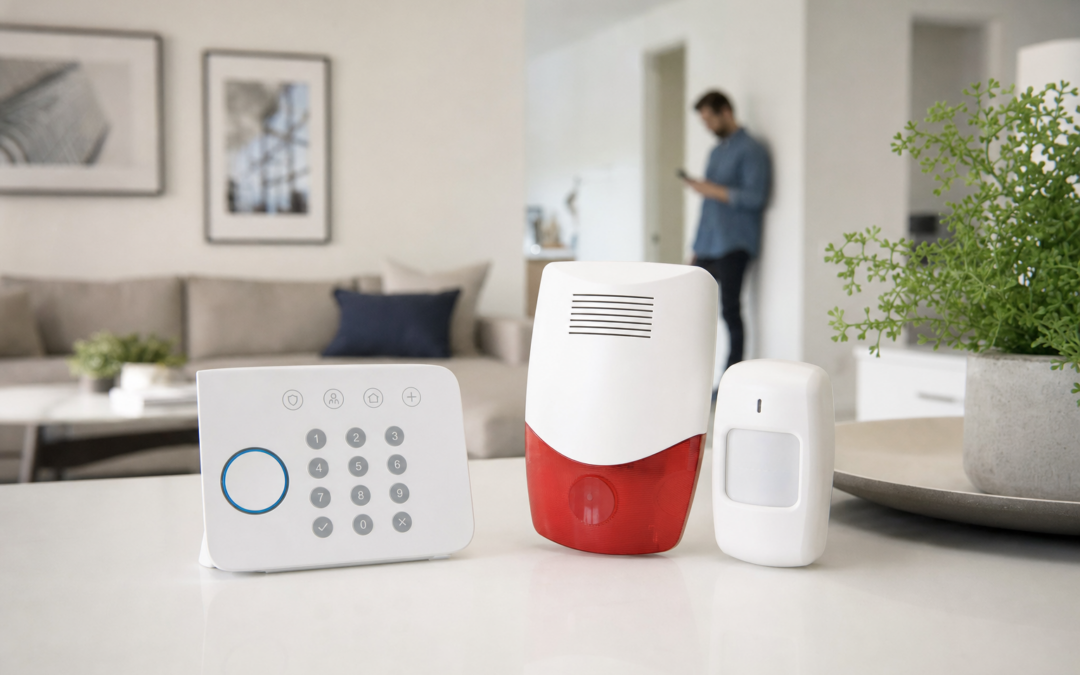
Wireless sirens and keypads are essential components of a modern DIY home alarm system. With advances in wireless technology, homeowners can now install effective security without running wires or hiring professional installers. Whether you want to boost your front entry security, add a loud deterrent to your garage, or control your alarm system remotely, choosing the right wireless siren or keypad can make a big difference in safety and convenience.
In this guide, we’ll cover the practical aspects of selecting wireless sirens and keypads for your DIY alarm setup. We’ll look at range, reliability, ease of installation, and compatibility with popular alarm brands. Whether you’re expanding an existing system or starting from scratch, you’ll find clear advice on what to look for—and which features actually matter in real-world home defense.
Why Go Wireless for Sirens and Keypads?
Wireless technology has transformed home security, making it more accessible and flexible than ever. A wireless siren or keypad means you don’t need to drill holes or run cables through your walls, which is a major advantage for renters and those looking to avoid permanent changes. Wireless devices are also easier to relocate, letting you adjust your setup as your needs change.
In the past, hardwired systems were seen as more reliable, but advances in battery technology and radio communication have closed the gap. Many modern wireless sirens and keypads offer backup batteries, encrypted signals, and extended ranges—making them an excellent choice for both small apartments and larger homes.
How Wireless Sirens and Keypads Work
Wireless sirens and keypads communicate with your main alarm panel (or hub) using radio frequencies, often in the 433MHz or 2.4GHz range. When a sensor is triggered or a user enters a code, the keypad or siren sends a secure signal to the hub, which then takes action—such as sounding an alarm or notifying your phone.
Keypads usually allow you to arm and disarm your system without needing a smartphone app, which is helpful for guests or family members. Wireless sirens, meanwhile, provide a loud deterrent wherever you need them—on a shed, a detached garage, or an upstairs hallway.
Key Features to Look For
- Range: Check the manufacturer’s stated range and consider obstacles like walls and metal objects, which can reduce signal strength. Most quality devices offer at least 100–200 feet of indoor range.
- Battery Life: Look for units with long battery life and low-battery alerts. Some sirens and keypads can last over a year on a set of batteries.
- Volume: For sirens, volume is critical. Seek out models rated at 100 decibels or higher for effective deterrence.
- Compatibility: Ensure the device works with your existing alarm system or smart home platform (like Ring, SimpliSafe, or ADT).
- Weather Resistance: If installing outdoors, look for weatherproof ratings (such as IP65 or better).
- Mounting Options: Consider whether the device can be wall-mounted, placed on a shelf, or used portably.
Wireless Siren and Keypad Placement Tips
Proper placement ensures your sirens and keypads are both effective and convenient. Here are some practical guidelines:
- Entry Points: Install a keypad near the main entry for easy arming/disarming. Place sirens by vulnerable entry points to startle intruders.
- Garage and Outbuildings: Use wireless keypads or sirens to secure detached garages or sheds—no wiring required.
- Multiple Levels: For multi-story homes, place a siren on each floor to ensure the alarm is heard throughout the house.
- Visibility: Mount sirens where they’ll be noticed by intruders, which boosts their deterrent effect.
- Avoid Obstructions: Keep devices away from heavy metal objects and thick walls to maximize range.
Understanding Wireless Range and Signal Strength
Range is one of the most important factors when choosing wireless alarm components. Manufacturers often list the maximum open-air range, but real-world conditions—like walls, appliances, and interference from other wireless devices—will shorten this distance.
For most US homes, a range of 100–200 feet is sufficient. If you have a large property or outbuildings, look for devices with higher range ratings or consider wireless repeaters. Test your devices after installation and reposition if you notice communication drops. Some systems provide signal strength indicators in their apps or on the keypad display.
Integrating Wireless Sirens and Keypads with Your Alarm System
Not all wireless sirens and keypads are universal—many are designed for specific brands or systems. Before buying, check compatibility lists and look for devices that support your alarm platform. For example, the Ring ecosystem offers a range of compatible keypads and sirens that integrate seamlessly with their sensors and cameras.
If you’re building a system from scratch, consider starting with a hub that supports third-party devices (such as some Z-Wave or Zigbee hubs). This will give you more flexibility to mix and match components as your needs evolve. For a full overview of your options, visit our alarms & smart security hub.

Ring Sensors: Glass Break Sensor (newest model) Review — Practical categories from Ring, summarized from hub features and listed measurements. Key figures include 2 , 53, 2.
Comparing Loudness: How Much Volume Do You Need?
A loud siren is a key part of any alarm system. Most burglars will flee at the sound of a powerful siren, and neighbors are more likely to notice and respond. Decibel (dB) ratings make it easy to compare models: a typical indoor alarm siren produces 100–120 dB, which is about as loud as a rock concert or chainsaw.
For outdoor or detached garage use, higher volume is better—look for 125 dB or more. Some wireless sirens also flash lights or strobes to attract attention. Remember, louder is not always better for indoor use, especially if you have pets or young children; balance deterrence with comfort.

WSDCAM Glass Break Sensor Alarm 125dB Ultra-Slim Wireless Glass Break Review — A wsdcam pick in Smoke Detectors & Fire Alarms that focuses on real-world usability Key figures include 125 , 0.396832 pounds, 4.
Wireless Keypads: Security and Usability
Wireless keypads are your main interface with a DIY alarm system. The best models offer a simple, reliable way to arm and disarm your system without fussing with your phone or app. Look for backlit keys, tamper detection, and secure mounting options. Some keypads even support multiple user codes, so you can track who enters and when.
Outdoor keypads should be weather-resistant and easy to use with gloves. Wireless garage door keypads, for instance, provide secure, convenient access without needing a separate remote.

Chamberlain Genuine Universal myQ Wireless Garage Door Keypad Review — A CHAMBERLAIN pick in Keypads & Remotes that focuses on real-world usability Key figures include 1993 , 1.24 , 1.
Garage Door Security: Wireless Keypad Solutions
Your garage is one of the most common entry points for burglars—especially if it’s attached to your home. Wireless garage door keypads are a practical addition to any alarm system, letting you open and close the door securely with a PIN code. Many models are compatible with major brands like Chamberlain and Genie, and installation usually takes just a few minutes.
Look for keypads with rolling code technology, which changes the access code after each use to prevent hacking. Battery life is also important, as many garage keypads are installed outdoors.

Genie Garage Door Opener Wireless Keyless Keypad Review — Genie keypads & remotes gear aimed at buyers who want clear specs before they click through. Key figures include 1995, 1 Pack, 9 .
Installation: What to Expect with Wireless Devices
Most wireless sirens and keypads are designed for true DIY installation. Common steps include:
- Mounting the device with screws or adhesive (usually included).
- Inserting batteries (typically AA, AAA, or 9V).
- Pairing the device with your alarm hub, which may involve pressing a sync button or entering a code.
- Testing the device to ensure signal strength and proper operation.
Always follow the manufacturer’s instructions and test each device after installation. Keep extra batteries on hand, and consider labeling your devices for easy troubleshooting later.
Maintaining Your Wireless Alarm Components
Even the best wireless sirens and keypads require routine maintenance to stay effective. Here are some essential tips:
- Test Regularly: Set a reminder to test all alarm components monthly. Many systems include a test mode for this purpose.
- Replace Batteries: Change batteries according to the manufacturer’s schedule, or immediately when you receive a low-battery alert.
- Inspect for Damage: Check for signs of weather damage, especially on outdoor devices.
- Update Firmware: Some smart keypads and sirens receive over-the-air updates—install these promptly for security improvements.
- Clean Contacts: Battery contacts can corrode over time; clean them if you notice issues with power or connectivity.
Integrating with Smart Home Platforms
Many wireless sirens and keypads now support integration with smart home platforms like Alexa, Google Home, or Apple HomeKit. This opens up possibilities such as:
- Arming or disarming your system with voice commands.
- Receiving mobile alerts if a siren is triggered or a keypad is tampered with.
- Automating lights or cameras to activate alongside your siren for maximum deterrence.
Before purchasing, check for compatibility with your preferred platform. Some systems require a bridge or hub for smart home integration.
Practical Troubleshooting: Common Wireless Alarm Issues
Even high-quality wireless devices can have occasional issues. Here are some common troubleshooting steps:
- Signal Drops: Move the device closer to the hub, or remove sources of interference (like microwaves or Wi-Fi routers).
- False Alarms: Ensure sensors are mounted securely and away from moving curtains, pets, or HVAC vents.
- Unresponsive Keypads: Replace the batteries and check for physical obstructions or tampering.
- Pairing Failures: Reset the device and repeat the pairing process according to the manual.
If problems persist, check the manufacturer’s website or support line for firmware updates or known issues.
Final Thoughts: Building a Reliable DIY Alarm with Wireless Sirens and Keypads
Wireless sirens and keypads give homeowners powerful tools for defending their homes—without the hassle and expense of a professional install. By focusing on range, volume, compatibility, and smart features, you can customize a solution that fits your property and lifestyle. Remember to test regularly, keep spare batteries, and update your system as needed to stay ahead of evolving security threats.
For more in-depth guides and reviews on alarms, sensors, and smart security gear, see our Alarms & Smart Security hub.
Wireless Siren & Keypad Installation Checklist
- Check Compatibility: Confirm the devices are compatible with your alarm hub or security system before purchase.
- Read Instructions: Review the manufacturer’s installation manual and any online resources or videos.
- Test Signal Strength: Before permanent mounting, test the device in your desired location to ensure reliable communication with the hub.
- Install Fresh Batteries: Use new, high-quality batteries to maximize performance and lifespan.
- Mount Securely: Use the included hardware or recommended adhesives for a secure fit. Avoid mounting on metal surfaces unless specified as compatible.
- Label Devices: Name each device in your alarm app or control panel for easy identification and troubleshooting.
- Set Up Alerts: Enable low-battery and tamper notifications in your app, if available.
- Test Functionality: Trigger test alarms to verify the siren volume and keypad response from all intended locations.
- Adjust Placement: If you experience weak signals or missed alerts, try repositioning the device or adding a wireless repeater/booster.
- Document Locations: Keep a record of device locations and battery replacement dates for future reference.
Common Mistakes to Avoid with Wireless Sirens and Keypads
- Ignoring Range Limitations: Overestimating the range of your devices can leave blind spots. Always test in real conditions and don’t rely solely on manufacturer claims.
- Neglecting Battery Maintenance: Letting batteries run low can cause devices to fail at critical moments. Set calendar reminders for periodic checks.
- Improper Placement: Installing sirens or keypads behind heavy furniture, metal doors, or thick walls can weaken signals and reduce effectiveness.
- Forgetting About Tamper Alerts: Not enabling or testing tamper features may leave your system vulnerable if a device is removed or disabled by an intruder.
- Mixing Incompatible Brands: Combining devices from different brands without verifying interoperability can lead to communication issues and unreliable alarms.
- Failing to Secure Devices: Using weak adhesives or loose screws can result in devices falling or being easily tampered with.
- Overlooking Firmware Updates: Missing crucial software or firmware updates can leave your system vulnerable to bugs or security flaws.
Maintaining Your Wireless Sirens and Keypads
Regular maintenance is essential for keeping your wireless alarm components in top working order. Unlike hardwired systems, wireless devices rely on batteries and radio signals, both of which can degrade over time. Here are some best practices for long-term reliability:
- Battery Checks: Test and replace batteries at least once a year, or whenever you receive a low-battery alert. Use high-quality alkaline or lithium batteries for longer life.
- Clean Contacts: Periodically remove the device and clean the battery contacts with a dry cloth to prevent corrosion.
- Firmware Updates: Check your alarm app or manufacturer’s website for updates that improve device performance or security.
- Physical Inspection: Inspect devices for dust, cobwebs, or insect nests, especially if installed outdoors or in garages and sheds. Clean gently with a soft brush or cloth.
- Check Mounting Hardware: Make sure screws, brackets, or adhesives remain secure and replace if needed.
- Signal Testing: Every few months, walk through your home and trigger test alarms to confirm all sirens and keypads are responding as expected.
- Review Notification Settings: Ensure push notifications and alerts are still enabled and being received on your phone or control panel.
By following these steps, you’ll greatly reduce the chances of a malfunction just when you need your alarm system most.
FAQs: Wireless Sirens and Keypads
Can wireless sirens and keypads be used outdoors?
Yes, but you must select models specifically rated for outdoor use. Look for weatherproofing (such as IP65 or higher) and ensure the operating temperature range matches your climate. Indoor-only devices should never be used outside, as moisture and extreme temperatures can damage electronics and batteries.
How long do batteries typically last in wireless sirens and keypads?
Battery life varies by model and usage. Most quality wireless sirens and keypads last 1–3 years on a set of batteries under normal use. Frequent alarms, extreme cold, or constant tamper alerts can drain batteries faster. Always monitor battery levels in your app or schedule annual replacements to avoid surprises.
What happens if the wireless signal is interrupted?
If a device loses connection with the alarm hub, most systems will alert you via the app or keypad display. Some advanced models have local memory and can sound their siren even without hub communication. However, always verify this feature before purchase if you’re concerned about signal interruptions.
Are wireless keypads secure from hacking?
Reputable brands use encrypted wireless protocols (such as AES-128) to prevent interception or spoofing. Avoid generic or no-name devices that lack clear security documentation. For maximum security, keep your alarm firmware updated and use strong, unique PIN codes for each user.
Can I use multiple sirens or keypads with one alarm system?
Most modern alarm systems allow you to add multiple wireless sirens and keypads, which is ideal for large homes or multi-entry properties. Always check your hub’s maximum device limit and ensure each device is registered and tested after installation.
How do I reset or re-pair a wireless siren or keypad?
Each brand has its own reset and pairing procedure, usually involving a button press or menu option. Refer to the manufacturer’s manual for step-by-step instructions. If a device won’t reconnect, try removing and re-adding it in your alarm app, or contact customer support for assistance.
Will my wireless siren or keypad work during a power outage?
Yes, as long as the device has working batteries. However, if your main alarm hub loses power and lacks battery backup, the entire system may go offline. For best results, choose a hub with built-in battery backup and regularly test all components under simulated outage conditions.
Troubleshooting Wireless Sirens and Keypads
- No Response from Device: Check and replace batteries, verify the device is within range, and confirm it’s properly registered with the alarm hub.
- Intermittent Alerts: Look for sources of signal interference, such as thick walls, microwaves, or nearby Wi-Fi routers. Reposition the device or add a repeater if necessary.
- False Alarms: Ensure devices are mounted securely and away from vibration sources. Review sensitivity settings in your app or control panel.
- Low Volume Siren: Check for debris blocking the siren grill. If outdoors, ensure the weatherproof seals are intact and not muffling the sound.
- Keypad Not Registering Codes: Clean the keypad surface, ensure the firmware is up-to-date, and verify the device is not exposed to direct sunlight or moisture that could affect performance.
Safety and Privacy Considerations
While wireless sirens and keypads provide flexibility, they also introduce new considerations for safety and privacy:
- PIN Code Security: Use unique, hard-to-guess codes for each user and update codes regularly, especially after guests or contractors have had access.
- App Security: Enable two-factor authentication on your alarm app and use a strong password to prevent unauthorized access to your system.
- Physical Tamper Protection: Choose devices with built-in tamper detection, and mount them out of easy reach when possible.
- Data Privacy: Review the manufacturer’s privacy policy to understand what data is collected and how it’s used. Opt for brands with strong data protection practices.
Taking these steps helps ensure your wireless alarm system protects your home—without compromising your privacy or safety.