
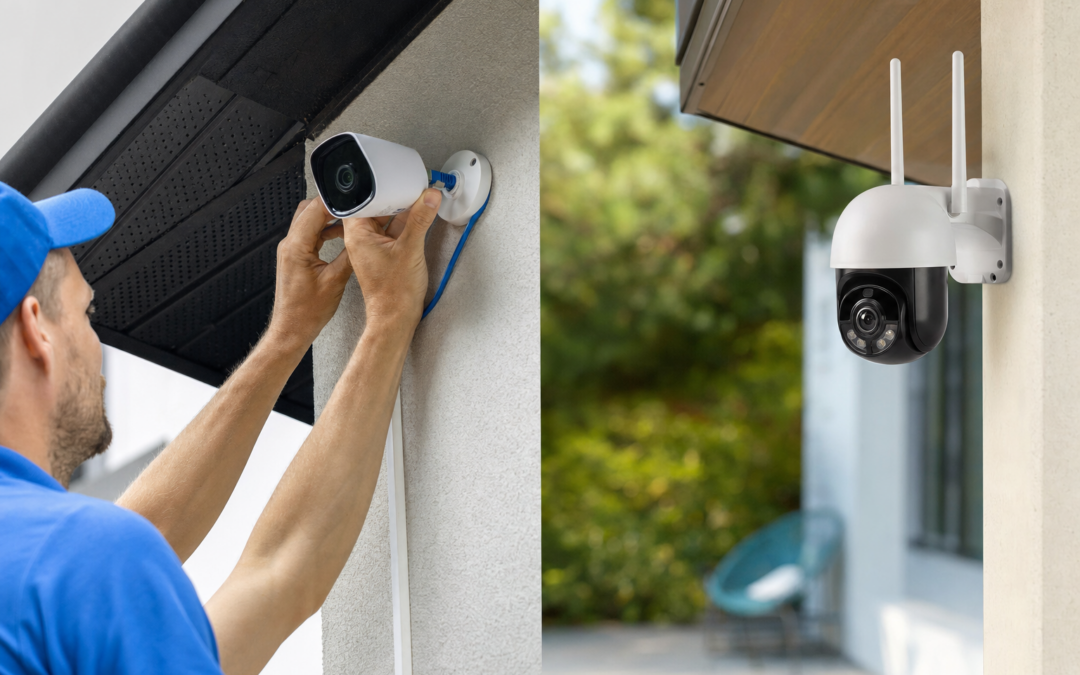
Choosing between Power over Ethernet (PoE) and Wi-Fi security cameras is one of the first big decisions homeowners face when upgrading their surveillance system. Both options can provide robust protection, but the differences in reliability, installation, and day-to-day convenience are significant. Understanding these tradeoffs can help you select the right camera system for your property, budget, and comfort level with technology.
On one side, PoE cameras have a reputation for rock-solid connections and consistent video quality. On the other, Wi-Fi cameras promise easy installation and flexible placement—no need to run cables through the walls. The right choice depends on your priorities, property layout, and expectations for ongoing performance.
Understanding PoE and Wi-Fi Security Cameras
Before comparing their strengths and weaknesses, it’s important to clarify how PoE and Wi-Fi cameras work. PoE security cameras draw both power and network connectivity from a single Ethernet cable, typically connected to a network switch or PoE injector. This eliminates the need for separate power supplies or wireless signals, streamlining installation in some scenarios.
Wi-Fi security cameras, by contrast, connect wirelessly to your home’s router or mesh network. They require a power source (either a plug-in adapter or battery), but don’t need to be physically tethered to your network hardware. This flexibility is a major selling point for renters, small homes, and DIYers who want to avoid invasive installation.
The Reliability Factor: PoE’s Key Advantage
Reliability is where PoE cameras shine. Because they use a wired connection, there’s minimal risk of interference or signal dropouts, even if your Wi-Fi network gets overloaded or your internet service experiences hiccups. PoE cameras can continuously stream high-definition video without buffering or lag, regardless of how many devices are on your network.
This makes PoE a preferred choice for:
- Larger homes or properties with many cameras
- Users who need 24/7 recording with no interruptions
- Situations where security is critical (e.g., small businesses, remote properties)
- Environments with thick walls or heavy wireless interference
Additionally, PoE systems are less vulnerable to hacking attempts targeting Wi-Fi encryption or signal jamming devices. The direct wired connection simply offers fewer attack vectors for would-be intruders.
When Wi-Fi Security Cameras Make Sense
While PoE is tough to beat for reliability, Wi-Fi cameras offer tremendous convenience. The biggest advantage is their ease of installation—if you’re comfortable connecting a device to your home’s Wi-Fi, you can likely set up a Wi-Fi camera without drilling holes or running cables. This makes them ideal for renters, apartment dwellers, or anyone who wants to avoid altering the building’s structure.
Other scenarios where Wi-Fi cameras excel include:
- Monitoring areas far from Ethernet outlets or network switches
- Adding a camera to a detached garage, shed, or driveway
- Temporary setups, such as monitoring a new property or vacation home
- Users who want to move or re-aim cameras frequently

Blink Outdoor 4 – Wireless smart security camera Review — An editorial look at this Blink option for categories — specs first, marketing second. Key figures include 4 , 53, 5 .
Many modern Wi-Fi cameras offer strong encryption and automatic firmware updates, closing much of the security gap with PoE systems. However, their performance is still subject to the quality and range of your Wi-Fi network.
Installation Tradeoffs: What to Expect
The installation process is one of the biggest differences between PoE and Wi-Fi cameras. PoE cameras require running Ethernet cables from each camera location to a central network switch or PoE injector. This can mean drilling through walls, crawling through attics, or hiring a professional installer—especially for multi-camera systems or homes with finished basements and hard-to-access spaces.
Wi-Fi cameras, by contrast, can often be mounted with just a screw or adhesive pad. As long as the camera is within range of your wireless router (and has access to a power source), you’re good to go. Devices like the Blink Outdoor 4 are designed specifically for this kind of plug-and-play setup.

Blink Video Doorbell + Outdoor 4 Review — Blink categories gear aimed at buyers who want clear specs before they click through. Key figures include 4 , 4, 1 .
For homeowners comfortable with basic handyman tasks, PoE installation can be a one-time investment that pays off in long-term reliability. But for those who value speed and simplicity, Wi-Fi cameras are hard to beat.
Power Supply and Outage Considerations
Both PoE and Wi-Fi cameras have specific requirements and vulnerabilities when it comes to power. PoE cameras receive their electricity directly from the Ethernet cable, so as long as your network switch or injector is backed up by a UPS (uninterruptible power supply), your cameras can keep running during short power outages. This is a big advantage if you need continuous coverage during storms or brownouts.
Wi-Fi cameras usually rely on plug-in adapters or batteries. Battery-powered models, like many modern outdoor Wi-Fi cameras, can continue operating even if the power goes out—at least until the battery runs dry. However, if your Wi-Fi router loses power, your cameras may not be able to communicate with your phone or the cloud, limiting real-time alerts and remote viewing. Always plan your power backup strategy accordingly.

2026 Enhanced 2K UHD Security Cameras Wireless Outdoor Review — Practical bullet cameras from realhide, summarized from hub features and listed measurements. Key figures include 24, 7, 2.13 .
For critical security zones, consider mixing both types: use PoE cameras for vital coverage areas and supplement with battery-powered Wi-Fi units for hard-to-wire spots or backup during outages.
Video Quality and Bandwidth Differences
Video quality is often touted as a selling point, but the delivery method can impact real-world performance. PoE cameras can easily handle 4K streaming and high frame rates thanks to the bandwidth available over Ethernet cables—usually up to 1 Gbps or more. This ensures smooth, detailed footage, even with multiple cameras recording simultaneously.
Wi-Fi cameras, on the other hand, share network bandwidth with all your other wireless devices. In a crowded home network, this can result in lower resolution streams, dropped frames, or delayed alerts. Walls, appliances, and distance from the router can further reduce signal strength and reliability.
That said, modern Wi-Fi cameras have made great strides in compression and adaptive streaming, which helps optimize video quality even on slower connections. Some models allow you to choose between local storage (on an SD card) or cloud upload, balancing convenience and bandwidth use.
Security and Privacy Concerns
Network security is a concern for any connected device. PoE cameras, with their wired setup, are generally more resistant to eavesdropping, hacking, or jamming. They’re not completely immune—compromising your network switch or NVR could still expose your feeds—but the attack surface is smaller.
Wi-Fi cameras, especially older or budget models, may be vulnerable to brute-force attacks, outdated security protocols, or weak passwords. Always choose cameras with robust encryption protocols (WPA2 or WPA3), enable two-factor authentication, and regularly update firmware to patch security holes.
For both types, physically securing the camera (to prevent tampering) and choosing strong, unique passwords for your devices and accounts are essential steps. For more on choosing secure cameras and best practices, see our cameras & surveillance hub.
Scalability: Expanding Your System Over Time
If you plan to start with a few cameras and add more later, it’s important to understand how each system scales. PoE networks can support dozens of cameras on a single switch, and adding new cameras is as simple as running another Ethernet cable and connecting it to the network. Many professional-grade NVRs (network video recorders) are designed to handle expansion with minimal hassle.
Wi-Fi systems scale differently. Most consumer-grade Wi-Fi routers can only handle a handful of cameras before bandwidth or interference becomes a problem. Adding range extenders or switching to a mesh network can help, but you may still encounter dead zones or reduced performance as the number of devices grows.
If you envision a large, fully integrated security setup, PoE is usually the smarter long-term investment. For smaller homes or apartments, Wi-Fi’s flexibility may be all you need.
Maintenance, Updates, and Troubleshooting
Maintenance requirements differ between the two systems. PoE cameras are generally “set and forget”—once installed, they require minimal upkeep beyond the occasional firmware update. If something goes wrong, troubleshooting is usually straightforward: check the cable, switch, or NVR.
Wi-Fi cameras, in contrast, may require more regular attention. Battery-powered models need periodic recharging or battery replacement. Signal interference, router resets, and software updates can all impact performance. Most brands offer mobile apps for updates and troubleshooting, but you should be prepared for the occasional connectivity hiccup.
Pro tip: Regularly check all cameras, regardless of type, to ensure they’re recording and accessible. Dust off lenses, clear cobwebs, and verify that alerts and notifications are still active.
Cost Comparison: Upfront and Ongoing Expenses
Budget is always a factor. PoE cameras often cost more up front, especially when factoring in the price of a PoE switch, cabling, and professional installation if needed. However, they don’t require batteries and can store video locally on an NVR, which may reduce or eliminate monthly cloud storage fees.
Wi-Fi cameras tend to be more affordable individually and can be installed without professional help, keeping startup costs low. However, battery-powered models require periodic battery purchases or recharging. Many brands also charge for cloud storage, advanced features, or premium support.
Over time, the cost difference may narrow, especially if you need to add range extenders, replace batteries, or subscribe to multiple cloud plans. Consider the total cost of ownership over three to five years—not just the sticker price.
Which Is Right for You? Making the Final Decision
The choice between PoE and Wi-Fi security cameras boils down to your specific needs, property layout, and personal preferences. Here’s a quick checklist to help guide your decision:
- Choose PoE if: You want maximum reliability, are comfortable running cables (or hiring an installer), and need seamless coverage for a larger home or business.
- Choose Wi-Fi if: You value easy installation, want to avoid drilling or rewiring, or need flexible, portable coverage for smaller spaces.
Many homeowners find that a hybrid system—using PoE for primary coverage and Wi-Fi cameras for supplemental or hard-to-wire areas—offers the best of both worlds. Review your property’s layout, consider your internet and power setup, and think about how your needs might change over the next few years.

2026 Upgraded 2K Security Cameras Wireless Outdoor ( ) Review — Practical bullet cameras from realhide, summarized from hub features and listed measurements. Key figures include 3, 1 , 5 .
For more recommendations and in-depth reviews of top-rated security cameras, browse our Cameras & Surveillance hub.
Practical Tips for a Successful Installation
Regardless of which system you choose, a thoughtful approach to installation will maximize your cameras’ effectiveness. Here are a few tips:
- Map out your coverage zones. Identify entry points, blind spots, and high-traffic areas. Test Wi-Fi signal strength or plan cable routes before drilling or mounting.
- Use quality cables and hardware. For PoE setups, invest in Cat5e or Cat6 cables and weatherproof connectors for outdoor runs. For Wi-Fi, ensure your router and extenders are up to the task.
- Mount cameras securely and discreetly. Use tamper-resistant mounts, and avoid obvious locations that are easy to disable or vandalize.
- Test everything before finalizing installation. Temporarily power and connect each camera to confirm video quality, alerts, and connectivity before permanently mounting.
- Back up your footage. Whether using local storage or the cloud, set up automatic backups and periodically verify that footage is being saved correctly.
Taking the time to plan and test your system will pay off in peace of mind and long-term performance.
Conclusion: Balancing Reliability and Convenience
PoE and Wi-Fi security cameras both offer clear benefits and some limitations. PoE’s rock-solid reliability and consistent performance make it the gold standard for demanding applications, while Wi-Fi cameras deliver unbeatable ease of use and installation flexibility.
Ultimately, the best system is the one that fits your property, budget, and comfort level. Consider your priorities—whether that’s uninterrupted 24/7 recording or the freedom to set up a camera anywhere in minutes. For most homeowners, a thoughtful mix of both technologies can provide comprehensive coverage with minimal hassle.
No matter your choice, investing in a quality surveillance system is a smart step toward protecting your home, family, and peace of mind.
Common Mistakes to Avoid with Security Camera Installation
Whether you choose PoE or Wi-Fi security cameras, certain pitfalls can undermine your system’s effectiveness. Avoiding these mistakes will ensure you get the most out of your investment:
- Ignoring camera placement: Positioning cameras too high, too low, or in areas with obstructions can limit their field of view and reduce image clarity. Always test your camera’s perspective before finalizing installation.
- Neglecting network capacity: For Wi-Fi cameras, adding too many devices can overwhelm your network and cause lag or dropped footage. For PoE, ensure your switch or injector can handle the total power draw, especially for multi-camera setups.
- Overlooking power needs: Battery-powered Wi-Fi cameras need regular charging or battery swaps, while PoE cameras require a reliable power source via Ethernet. Failing to plan for this can result in unexpected downtime.
- Skipping firmware updates: Both PoE and Wi-Fi cameras rely on up-to-date software for security and performance. Set reminders to check for updates or enable automatic updates if available.
- Not securing your network: Weak passwords, outdated encryption, or open networks can leave your cameras vulnerable to hacking. Use strong, unique passwords and enable the latest security protocols.
Maintenance Tips for Long-Term Camera Reliability
Security cameras are not a set-and-forget solution. Proper upkeep can dramatically extend their lifespan and ensure ongoing protection:
- Clean lenses regularly: Dirt, dust, and cobwebs can obscure footage. Wipe camera lenses gently with a microfiber cloth every few months.
- Check connections: For PoE cameras, inspect Ethernet cables and connectors for wear or corrosion annually. For Wi-Fi cameras, verify that power adapters and batteries are functioning properly.
- Test camera feeds: Periodically review live and recorded footage to catch any glitches, dead zones, or storage issues before they become problems.
- Review storage: Make sure your NVR, DVR, or cloud storage isn’t full or malfunctioning. Set up alerts if your system supports them.
- Monitor for firmware updates: Regularly check the manufacturer’s app or website for security patches and feature updates.
- Trim nearby vegetation: For outdoor cameras, keep branches, leaves, and other obstructions clear to maintain a clear view and avoid false motion alerts.
Checklist: Choosing Between PoE and Wi-Fi Cameras
Still unsure which system fits your needs? Use this quick checklist to clarify your priorities:
- Property size and layout: Large or multi-story homes often benefit from PoE for consistent coverage. Smaller properties or apartments may find Wi-Fi sufficient.
- Installation willingness: Are you comfortable running cables, or do you prefer a tool-free setup?
- Camera mobility: Will you want to move cameras frequently, or are you seeking a permanent solution?
- Power access: Do you have easy access to power outlets, or would you rather rely on Ethernet-powered devices?
- Network strength: Is your Wi-Fi robust enough to handle multiple high-definition streams, or would your cameras work better on a dedicated wired network?
- Security concerns: Are you in a high-risk area where reliability and resistance to hacking are paramount?
- Budget: Can you invest in professional installation (PoE), or do you prefer a DIY solution (Wi-Fi)?
Frequently Asked Questions About PoE and Wi-Fi Security Cameras
Can I mix PoE and Wi-Fi cameras in one system?
Yes, many modern NVRs and smart home platforms support both PoE and Wi-Fi cameras. This hybrid approach lets you hardwire cameras in critical locations while using Wi-Fi cameras for flexible or hard-to-reach spots. Just ensure your recorder or software is compatible with both types and that your network can handle the combined load.
How far can PoE and Wi-Fi cameras be installed from the router or switch?
PoE cameras typically support cable runs up to 328 feet (100 meters) from the switch or injector. Wi-Fi camera range depends on your router, home layout, and interference, but 50–150 feet indoors is common. Thick walls and electronic devices can reduce Wi-Fi range, so always test signal strength before mounting cameras permanently.
What happens to my cameras if the power goes out?
Both PoE and Wi-Fi cameras will stop recording if they lose power—unless you have a backup solution. For PoE, connecting your network switch and NVR to an uninterruptible power supply (UPS) can keep your system running during short outages. Battery-powered Wi-Fi cameras will keep recording as long as their batteries are charged, but plug-in models will also need a UPS for backup.
Are PoE cameras more secure than Wi-Fi cameras?
Wired PoE connections are generally less susceptible to wireless hacking and interference. However, both PoE and Wi-Fi cameras can be vulnerable if default passwords are left unchanged or if firmware is not updated. Following security best practices is essential regardless of connection type.
Do Wi-Fi cameras require a monthly subscription?
Not always. Some Wi-Fi cameras offer free local storage or limited cloud recording. However, many brands charge a monthly fee for extended cloud storage, advanced features, or AI-based alerts. Be sure to check the manufacturer’s policy before buying.