
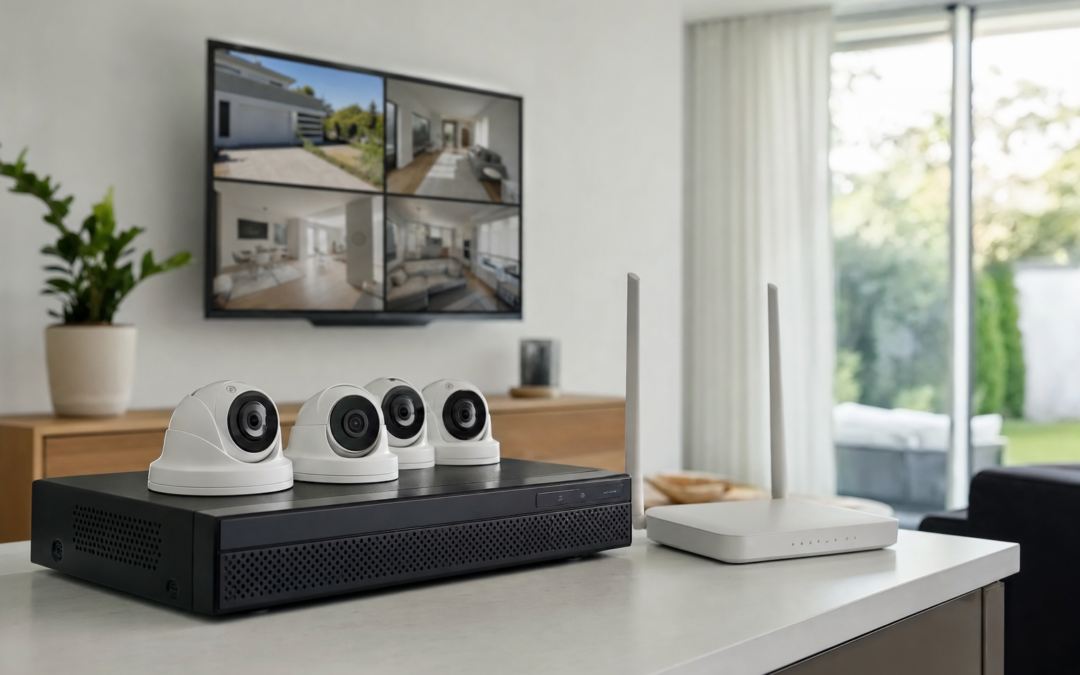
Choosing how your home security cameras store footage is one of the most important decisions you’ll make as a homeowner. The two main options—Network Video Recorder (NVR) systems and cloud camera storage—differ in how they keep your video, their privacy implications, and even the costs over time. The right choice depends on your needs for privacy, convenience, and how long you want to keep your recordings.
Understanding the pros and cons of NVR versus cloud storage can feel overwhelming, especially with marketing buzzwords and technical jargon. This guide breaks down the essentials, focusing on what really matters: local vs. remote access, storage retention, privacy, costs, and how to match the technology to your home’s security goals. If you need a broader overview of camera types and setups, see our main cameras & surveillance hub for context.
Understanding NVR: Local Storage Basics
An NVR (Network Video Recorder) is a dedicated device that stores video locally, usually on a hard drive within your home. It connects to your IP cameras over your home network—either through Ethernet cables (for wired systems) or WiFi (for wireless systems). The NVR collects and organizes video footage from all connected cameras, making it easy to review or export events as needed.
- Footage is stored at home: No third-party servers are involved—your recordings stay on your property.
- Continuous recording: NVRs can record 24/7 or only when motion is detected, depending on your settings.
- Expandable storage: Many NVRs let you add or swap hard drives to increase retention time.
- One-time purchase: After buying the NVR and cameras, there are usually no ongoing fees unless you add cloud backup options.
This approach is ideal if you want full control over your security data and don’t want to rely on an internet connection to access footage when you’re at home.

Blink Outdoor 4 – Wireless smart security camera Review — An editorial look at this Blink option for categories — specs first, marketing second. Key figures include 4 , 53, 5 .
How Cloud Camera Storage Works
Cloud camera storage sends your video footage to remote servers, usually managed by the camera manufacturer or a third-party provider. You access your recordings through a mobile app or web portal from anywhere with internet. Cloud storage is popular for its convenience and integration with smart home systems.
- Remote access: You can view live feeds and recorded clips from your phone or computer, wherever you are.
- No local hardware required: Many cameras upload directly to the cloud, so you don’t need a bulky recorder at home.
- Subscription-based: Most cloud services charge monthly or yearly fees for storage plans, with different retention periods and features.
- Automatic updates: Cloud platforms often update security features and add functions automatically.
This route is great if you want to check in when away from home and don’t mind recurring costs or storing footage off-site.

Blink Video Doorbell + Outdoor 4 Review — Blink categories gear aimed at buyers who want clear specs before they click through. Key figures include 4 , 4, 1 .
Comparing NVR and Cloud Storage: The Big Picture
The core difference comes down to where your footage lives and who can access it. Here’s a quick overview:
- NVR (Local): Video is saved at your home, often offering higher privacy and no recurring fees. Access is usually limited to your local network (unless you set up remote access).
- Cloud: Video is stored on remote servers, accessible from anywhere with internet. Offers easy access and sharing, but requires ongoing payments and depends on the provider’s security.
Let’s break down these differences in more detail so you can make an informed choice.
Retention: How Long Is Footage Kept?
Retention means how long your camera system keeps recordings before overwriting or deleting them. This is a major factor when comparing NVR and cloud solutions.
- NVR systems: Retention depends on the size of your hard drive and recording settings (resolution, frame rate, continuous vs. motion). With a large drive and motion-only recording, you could store weeks or even months of footage. Upgrading storage is usually as simple as swapping to a bigger drive.
- Cloud storage: Retention is capped by your subscription plan—commonly 7, 14, 30, or 60 days. Once your plan’s limit is reached, older video is deleted to make room for new recordings. If you need longer retention, you’ll pay more each month.
If you want to keep footage for legal reasons, or simply for peace of mind, NVR storage gives you more flexibility and control. Cloud plans are easy to manage, but you’re locked into whatever plan you pay for.
Privacy and Security: Who Can See Your Footage?
For many homeowners, privacy is the top concern. Here’s how each system stacks up:
- NVR (Local): Footage stays inside your home unless you enable remote access. Only you and anyone with physical or network access to the NVR can view recordings. There’s no risk of your footage being accessed by cloud service staff or breached online—unless your home network is compromised.
- Cloud: Video is sent over the internet to remote servers. While reputable providers use encryption and strong security, your footage is technically in someone else’s hands. Some services may analyze footage for features or share data with third parties (check privacy policies carefully). If the cloud provider is hacked, your videos could be at risk.
If you have sensitive areas under surveillance, or simply value privacy, NVR systems offer more peace of mind. Cloud storage is generally secure, but trusting a third party always carries some risk.

2026 Enhanced 2K UHD Security Cameras Wireless Outdoor Review — Practical bullet cameras from realhide, summarized from hub features and listed measurements. Key figures include 24, 7, 2.13 .
Access and Convenience: Local vs. Anywhere
How (and where) you want to access your camera footage is another major factor:
- NVR: By default, you access footage from a monitor connected to the NVR (or sometimes via a local web interface). Some NVRs allow secure remote access through apps or web portals, but this requires configuration—like port forwarding, VPNs, or cloud relay features.
- Cloud: Designed for easy access from anywhere, anytime. Log into your app or website and view live or recorded video instantly, even while traveling.
If you want to check cameras while at work, on vacation, or out running errands, cloud-based cameras are simpler. If you’re comfortable with local access (or setting up secure remote access yourself), NVRs work well and can be more private.
Cost Comparison: Upfront and Ongoing Fees
The cost structure for NVR and cloud storage is very different, and it’s important to look beyond just the sticker price of cameras.
- NVR: You’ll pay more upfront for the NVR box and possibly hard drives. After that, ongoing costs are minimal unless you add cloud backup or need to replace a drive years later.
- Cloud: Many cloud cameras are inexpensive at first, but require a monthly or annual subscription for storage and advanced features. These fees add up over time, especially for multiple cameras.
For example, a $10/month subscription is $120 per year—multiply that by several years and you could easily exceed the cost of an NVR system. Consider your long-term budget, and whether you prefer a one-time investment or ongoing payments for convenience.
Reliability: What Happens When the Internet Goes Down?
Your home’s internet connection plays a different role in each storage system:
- NVR: Cameras record to your local NVR regardless of internet status. Even if your internet goes out, footage is still being saved. You only lose remote access.
- Cloud: If your internet drops, cameras can’t upload footage to the cloud. Some models have small built-in storage for temporary backup, but most just stop recording until the connection returns.
If you live in an area with spotty internet, or want your security to be immune to outages, NVRs offer a clear advantage. Cloud systems are vulnerable if your connection is unreliable or slow.
Installation and Setup: Plug-and-Play or DIY?
Ease of installation can vary depending on your comfort with tech and home networking:
- NVR: Wired NVR systems require running Ethernet cables to each camera, which can be a challenge for multi-story homes or finished walls. Wireless NVRs exist, but still need to be within range of your home network. Setup involves configuring the NVR and connecting cameras, which may take a few hours.
- Cloud: Most cloud cameras are designed for quick DIY installation—plug in, connect to WiFi, and follow app instructions. No recorder box or hard drive to manage. If you’re renting, or don’t want to run cables, this is the easiest option.
Both systems can integrate with smart home platforms, but cloud cameras often have better out-of-the-box compatibility with Alexa, Google Home, and other assistants.
Scalability: Adding More Cameras Over Time
Thinking of expanding your camera coverage later? Here’s what to know:
- NVR: Each NVR has a set number of supported channels (typically 4, 8, or 16). Once you hit the limit, you’d need a new NVR to add more cameras. Upgrading storage is usually simple.
- Cloud: You can often add as many cameras as you want, but your subscription fees will increase as you add devices. Some plans limit the number of cameras per account or charge per device.
If you plan to cover a large property or keep adding cameras, calculate the total costs and technical limits before choosing a platform.
Hybrid Approaches: Combining Local and Cloud Storage
Some modern camera systems let you use both local and cloud storage, offering the best of both worlds. For example, you can record full-resolution video to an NVR at home for long-term retention, while uploading motion events to the cloud for quick remote access. This gives you redundancy: if your NVR is stolen, you still have cloud clips; if your internet fails, you still have local copies.
Many of the best-reviewed cameras, including options from Blink and others, offer hybrid options or let you choose your preferred storage method. Be sure to check each camera’s features and compatibility before buying.

2026 Upgraded 2K Security Cameras Wireless Outdoor ( ) Review — Practical bullet cameras from realhide, summarized from hub features and listed measurements. Key figures include 3, 1 , 5 .
Privacy Tips and Best Practices for Homeowners
Regardless of which storage method you choose, there are a few important steps to keep your video private and secure:
- Change default passwords: Always set strong, unique passwords for your NVR, cameras, and cloud accounts.
- Enable two-factor authentication: Many cloud platforms now offer this extra layer of security.
- Keep firmware updated: Regularly update your cameras and NVR to patch vulnerabilities.
- Segment your home network: Consider putting cameras on a separate WiFi network or VLAN to limit exposure if one device is compromised.
- Review privacy policies: If you use cloud storage, read the provider’s privacy policy. Know who can access your footage and how long it’s kept.
- Disable unnecessary features: Turn off remote access or cloud backup if you don’t need them.
Taking these steps helps protect your family’s privacy, no matter which technology you pick.
Which Is Right for You? Key Scenarios
Let’s match the pros and cons of each system to common homeowner scenarios:
- Privacy-first homeowner: Choose NVR with local storage. You control all footage and avoid third-party access.
- Frequent traveler: Cloud storage makes it simple to check cameras from anywhere, anytime—ideal for those who need remote access.
- Budget-conscious: NVR is more cost-effective over the long term, with no recurring fees. Cloud plans can exceed hardware costs within a few years.
- Tech-averse: Cloud cameras are easier to install and manage, with simple apps and fewer cables.
- Large property: NVRs handle multiple cameras with one system, but check channel limits. Cloud plans may get expensive for many devices.
- Unreliable internet: NVR ensures continuous recording even if your connection drops.
Think about your priorities: Do you value convenience or privacy more? Are you willing to pay for long-term cloud storage? Is your internet reliable enough for cloud-only solutions?
Making Your Final Choice
The decision between NVR and cloud storage isn’t one-size-fits-all. Both systems have their place in modern home security. NVRs offer maximum privacy, no ongoing costs, and strong reliability for those willing to spend more upfront and handle installation. Cloud cameras are unbeatable for remote access, simple setup, and integration with smart home gadgets—but require trust in a third-party provider and recurring payments.
Some homeowners find that a hybrid approach—using local NVR storage with selective cloud backup—offers the best mix of flexibility and peace of mind. Ultimately, your choice should reflect your household’s privacy needs, budget, technical comfort, and property layout.
If you need help choosing specific cameras or want more details on setting up a secure system, our cameras & surveillance hub offers in-depth reviews, guides, and practical tips tailored for US homeowners.
By weighing privacy, retention, access, reliability, and cost, you’ll be able to select a camera storage method that keeps your footage safe—and your mind at ease.
Common Mistakes When Choosing Camera Storage
Many homeowners rush into a camera storage solution without fully considering their needs, often leading to frustration or security gaps down the road. Here are some of the most common mistakes to avoid:
- Overlooking internet reliability: Relying solely on cloud storage in areas with spotty internet can result in missed footage or delayed alerts.
- Ignoring storage capacity: Not checking how much video your NVR hard drive or cloud plan can actually hold may mean overwriting important events sooner than expected.
- Assuming all footage is encrypted: Not all NVRs or cloud services offer strong encryption. Always confirm security features before purchase.
- Neglecting power backup: If the NVR or cameras lose power, recording stops. Consider a UPS (uninterruptible power supply) for critical devices.
- Forgetting about privacy policies: With cloud storage, your footage is subject to the provider’s privacy practices. Review these policies and check where servers are located.
- Underestimating ongoing costs: Cloud subscriptions can add up over time. Calculate the true cost over several years before deciding.
Maintenance Tips for NVR and Cloud Systems
Maintaining your camera storage system ensures reliability and longevity. Here’s how to keep both NVR and cloud setups running smoothly:
NVR Maintenance
- Regularly check hard drive health: Hard drives wear out. Most NVRs have tools to monitor drive status—replace drives at the first sign of trouble.
- Keep firmware updated: Updating your NVR and camera firmware patches security holes and adds features.
- Clean and ventilate equipment: Dust and overheating can shorten device life. Place NVRs in cool, dry spaces and clean vents periodically.
- Test backups: If you use USB or network backups, regularly confirm they work and store copies offsite if possible.
Cloud Storage Maintenance
- Monitor subscription status: Stay aware of renewal dates and plan limits to avoid losing footage unexpectedly.
- Review account security: Enable two-factor authentication and use strong, unique passwords for your cloud portal.
- Check camera connectivity: Periodically verify all cameras are online and uploading footage as expected.
- Stay updated: Cloud platforms often update automatically, but check for app updates on your phone or computer to ensure compatibility.
Checklist: What to Consider Before Deciding
Before committing to NVR or cloud camera storage, run through this quick checklist to clarify your priorities and needs:
- How important is privacy? Do you want footage to stay entirely within your home, or are you comfortable with remote servers?
- What’s your internet situation? Is your connection reliable and fast enough for continuous uploads, or could outages be an issue?
- How often do you need remote access? Will you regularly check footage while away, or mostly review it at home?
- What’s your budget for upfront and ongoing costs? Are you prepared for a larger initial investment (NVR) or monthly fees (cloud)?
- How long do you need to keep recordings? Will basic event clips suffice, or do you need weeks of 24/7 footage?
- Do you need integration with smart home systems? Some cloud cameras work seamlessly with voice assistants and automation routines.
- How comfortable are you with tech setups? NVRs may require more DIY installation and networking knowledge.
Evaluating these questions can help you match the right storage method to your lifestyle and security expectations.
Frequently Asked Questions
Can I use both NVR and cloud storage together?
Yes, many modern security setups offer hybrid options. Some NVRs support cloud backup for critical footage, and some cloud cameras offer local microSD or NAS recording as a backup. This gives you redundancy and flexibility, but it may increase complexity and cost.
What happens to my footage if my internet goes down?
With NVR (local) storage, cameras continue recording as long as your home network and power remain active. With cloud-only cameras, you may lose the ability to upload or view footage until connectivity is restored. Some cameras offer limited local recording as a failsafe—check your model’s specs.
Is cloud storage safe from hacking?
Reputable cloud providers use encryption and robust security protocols, but no system is entirely immune to breaches. Protect your account with strong passwords and two-factor authentication, and keep apps and devices updated to mitigate risks.
How long can I keep my recordings?
NVR storage duration depends on your hard drive size and recording settings (resolution, frame rate, number of cameras). Cloud plans typically offer 7, 14, or 30 days of rolling storage, with longer retention costing more. Check your provider’s terms for specifics.
Will I lose footage if my NVR is stolen?
If the physical NVR is stolen or destroyed, locally stored footage goes with it. For extra security, consider setting up automatic backups to a separate location or a cloud service for the most critical video clips.