
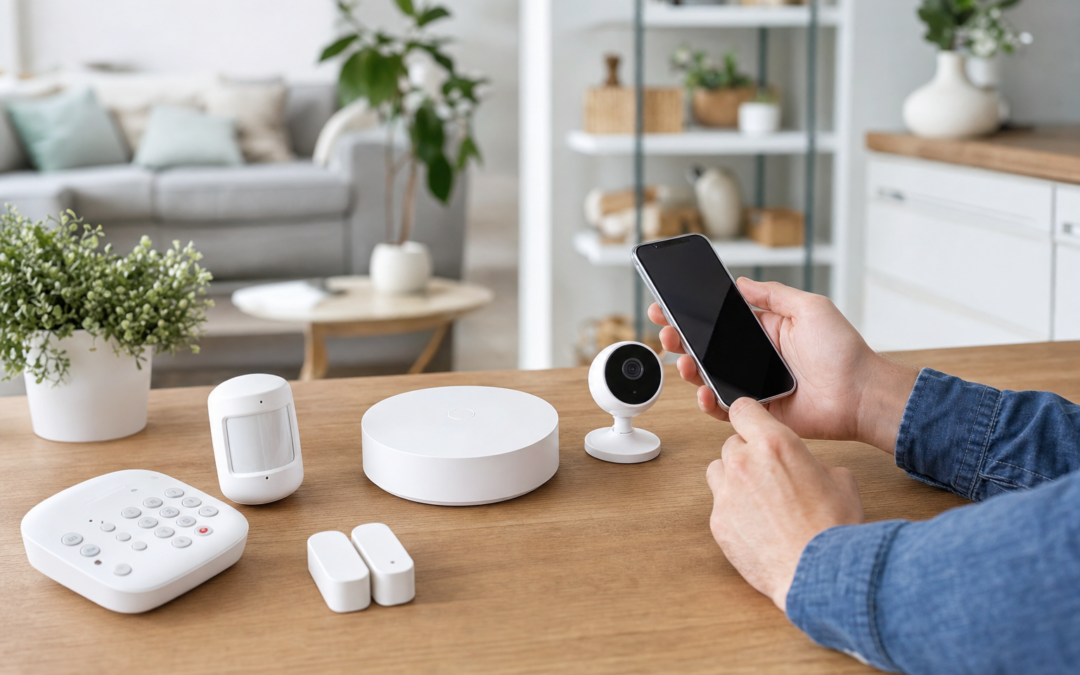
Getting started with home security can feel overwhelming, especially with the range of starter kits and smart devices now available. If you’re a first-time buyer, you want a system that’s easy to set up, expandable over time, and comes with an app you’ll actually use. The good news: today’s best home security starter kits make it possible to protect your home effectively without expert installation or massive up-front costs.
This guide breaks down what to look for in your first security kit, with a focus on expandability, app user experience, and practical add-ons that make your system truly secure. We’ll also highlight some top-rated components you can mix and match—including sensors, cameras, and signage—to build a setup that fits your lifestyle and budget.
What Makes a Good Home Security Starter Kit?
The best home security starter kits go beyond just alarms—they provide a foundation you can grow with, adapting as your needs change. For most US homes, an ideal starter kit should offer:
- Essential components: At a minimum, you want door/window sensors, a base station or hub, and a siren or alarm.
- Easy DIY installation: No need for a professional technician or special tools—modern kits use adhesive or simple mounting hardware.
- User-friendly app: The system should have a well-designed app for arming/disarming, real-time alerts, and device management.
- Expandability: Look for systems that allow you to add cameras, glass break sensors, smart locks, or motion detectors as your needs evolve.
- Reliable connectivity: Wi-Fi is standard, but backup cellular or battery options are a plus in case of outages.
- Integration: Compatibility with smart home platforms like Alexa, Google Assistant, or Apple HomeKit can make your system even more useful.
Starter kits should give you peace of mind from day one, but also let you upgrade without replacing everything as your family or home changes. For a broader look at the options, check out our home security system hub.
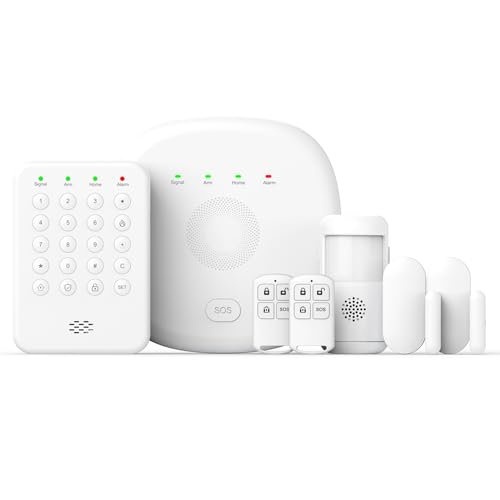
2026 Home Security System Review — An editorial look at this PGST option for home security systems — specs first, marketing second. Key figures include 1, 2 , 7 .
Starter Kits vs. Custom-Building Your System
If you’re new to home security, you might wonder whether to buy a pre-assembled starter kit or piece together your own system. Here’s how they compare:
- Starter kits: These are bundles from a single brand, usually including a hub, a few sensors, and sometimes a keypad or siren. They’re designed to work together out of the box, which means setup is fast and the app experience is unified.
- Custom systems: Building your own lets you pick and choose components from different brands. This gives you more flexibility, but may require extra research to ensure compatibility and can complicate the app experience.
For most first-time buyers, a starter kit is the best way to go. You’ll get a working system in under an hour, with room to add cameras, sensors, or smart locks later. Still, make sure your chosen brand supports add-ons so you’re not locked in.
Core Components: What Should Your Starter Kit Include?
Not all starter kits are created equal. Before you buy, make sure your kit covers these essentials:
- Base station or hub: The brain of the system, connecting all your sensors and relaying alerts to your phone.
- Entry sensors: Attach to doors and windows to detect unauthorized entry. Most kits come with at least two—enough for front and back doors—but you may need extras for more coverage.
- Motion detector: Covers larger spaces like hallways or living rooms. Great for catching intruders who might avoid entry sensors.
- Keypad or remote: Lets you arm or disarm the system without using your phone.
- Siren or alarm: A loud deterrent that sounds if a sensor is triggered while the system is armed.
Some kits also include yard signs or window stickers, which are proven to discourage break-ins by signaling your home is protected.

10″ x 28″ Home Security System Sign Review — An editorial look at this AzReference option for yard signs — specs first, marketing second. Key figures include 10 , 10 inch, 40 .
Expandability: Planning for the Future
One of the most important features to look for in a starter kit is expandability. Even if you only need basic protection now, life changes—maybe you move to a bigger place, get a pet, or want to monitor a garage or backyard. Look for systems that let you add:
- Glass break sensors: Detect the unique sound of glass shattering, covering windows that a basic sensor might miss.
- Security cameras: Indoor and outdoor cameras add visual verification and can help police respond faster in an emergency.
- Environmental sensors: Add-ons like smoke, CO, or water leak detectors can alert you to hazards beyond burglary.
- Smart locks and video doorbells: Integrate with your security system for complete control and monitoring.
Before you buy, check how many devices your system supports and whether you can add components from third-party brands. Some platforms are closed, while others (like certain Z-Wave or Zigbee hubs) are more flexible.
App User Experience: Why It Matters
The app is the control center for your home security system, so don’t overlook its importance. A good app should:
- Make setup easy: Look for step-by-step guides, clear icons, and in-app troubleshooting.
- Enable quick arming/disarming: You should be able to secure your home with a single tap, from anywhere.
- Send timely notifications: Real-time alerts for doors, windows, motion, or camera activity help you respond fast.
- Support multiple users: Let family or roommates access the system without sharing passwords.
- Offer automation and schedules: Some apps let you create routines (like arming at bedtime) or automate lights and locks.
Before buying a kit, download the app and check the reviews. Some brands offer demo modes, so you can test drive the interface before committing.
Monitoring: Professional vs. Self-Monitored Kits
Starter kits typically offer two choices: self-monitoring or professional monitoring. Here’s how they compare:
- Self-monitoring: You receive alerts on your phone and decide how to respond. There are no monthly fees, and you’re in full control. This is ideal for those who are tech-savvy and want zero ongoing costs.
- Professional monitoring: For a monthly fee, a central station watches over your home 24/7. If a sensor triggers an alarm, they’ll call you and dispatch emergency services if needed. Some starter kits offer the first month free so you can try it out.
Some systems let you switch between the two, or offer on-demand monitoring for vacations. Decide what level of peace of mind you need, and check if the kit requires a contract for pro monitoring.
Installation: DIY Setup Tips for First-Time Buyers
Modern home security starter kits are designed for DIY installation, with peel-and-stick sensors and step-by-step mobile setup. Here are some tips for a smooth install:
- Map your entry points: List all doors and first-floor windows. Place sensors on the most vulnerable ones first.
- Follow the app: Most systems guide you through pairing each device, testing connectivity, and setting up alerts.
- Test before mounting: Temporarily place sensors with painter’s tape to find the best spots before using permanent adhesive.
- Consider Wi-Fi range: Place the base station centrally, and check connectivity for each component before finalizing placement.
- Label devices: Give each sensor a clear name in the app (e.g., “Back Door” or “Garage Window”) for easier troubleshooting later.
Most starter kits take about 30-60 minutes for basic setup. Professional installation is rarely needed for these systems.
Key Add-Ons: Making Your Starter Kit More Effective
While a starter kit covers the basics, a few add-ons can make your system far more robust. If your budget allows, consider adding:
- Glass break sensors: Especially important for rooms with large windows or sliding glass doors.
- Outdoor cameras: Deter package thieves and provide video evidence if an incident occurs.
- Yard signs: Even a simple sign can turn away opportunistic burglars before they even approach.
- Smart lighting: Integrate with your system to make your home look occupied, even when you’re away.
The goal is to layer your defenses—deterrence, detection, and response—for maximum protection.

Ring Sensors: Glass Break Sensor (newest model) Review — Practical categories from Ring, summarized from hub features and listed measurements. Key figures include 2 , 53, 2.
Best Practices for Using Your New System
Once your starter kit is up and running, make the most of it by following these best practices:
- Test regularly: Check sensors and alarms monthly to ensure they’re working and batteries are fresh.
- Use unique codes or app logins: For family, roommates, or trusted guests. Some systems let you assign temporary codes for service providers.
- Set up away and home modes: Many systems let you customize which sensors are active when you’re home versus away—use this for pets or nighttime security.
- Review app notifications: Tweak settings so you’re only alerted about real threats, not every time a door opens.
- Update firmware: Keep your system and app updated for the latest features and security patches.
Remember, a security system is only effective if you use it—arm it consistently, and don’t ignore low-battery or offline warnings.
Common Pitfalls to Avoid with Starter Kits
Even the best kits can fall short if you overlook a few key things:
- Underestimating sensor needs: Most starter kits cover 2-3 doors or windows. For larger homes, plan to buy extra sensors right away.
- Ignoring app reviews: A clunky or unreliable app can make even the most advanced hardware frustrating to use.
- Forgetting about pets: Standard motion sensors may trigger false alarms. Look for “pet-immune” options or adjust settings accordingly.
- Not securing the hub: If your base station is easily accessible, an intruder could disable your entire system. Place it out of sight but within Wi-Fi range.
- Skipping signage: Don’t underestimate the deterrent effect of a well-placed yard sign or window sticker.
Planning ahead and reading the manual (or app guide) will help you avoid these common mistakes.
Frequently Asked Questions About Home Security Starter Kits
- Can I install a starter kit in a rental apartment? Yes—most kits use adhesive mounts that won’t damage walls, and you can take the system with you when you move.
- Do I need Wi-Fi for a starter kit to work? Nearly all systems use Wi-Fi for app control and alerts. Some offer backup cellular connections for emergencies, but these often require a subscription.
- Can I add cameras or sensors from other brands? Only if your system supports third-party devices. Most starter kits are brand-specific, but some hubs support Z-Wave, Zigbee, or Matter accessories.
- What happens if the power goes out? Many kits include battery backup for several hours; alerts may be limited without Wi-Fi, so check your kit’s specifications.
- Is professional monitoring worth it? It depends on your comfort level and local crime rates. Self-monitoring is free, but you’re responsible for calling for help. Professional monitoring provides 24/7 coverage but costs more.
Top Picks: Home Security Starter Kits and Add-Ons for 2026
Based on our hands-on testing and reader feedback, here are some standout components to consider as you build your first home security system:
- 2026 Home Security System: An all-in-one alarm kit with easy setup, reliable app, and strong expandability for sensors and cameras.
- Ring Sensors: Glass Break Sensor (newest model): An excellent add-on for windows and glass doors, integrating smoothly with Ring systems.
- 2K Security Camera System: A robust indoor/outdoor camera system with high-resolution video and motion alerts.
- 10″ x 28″ Home Security System Sign: An affordable, durable yard sign to boost your home’s visible protection.

2K Security Camera System Review — An editorial look at this Gianteye option for home security systems — specs first, marketing second. Key figures include 100, 2 hours, 360.
No matter which kit you choose, focus on expandability, app usability, and layering your security for best results. With the right starter kit, you’ll have peace of mind today and a strong foundation for the future.
Home Security Starter Kit Checklist for First-Time Buyers
Before making your purchase, it’s important to make sure you’re covering all your bases. Use this handy checklist to ensure you select a kit that fits your home and lifestyle:
- Assess your entry points: Count all exterior doors and accessible windows. Make sure your kit includes enough sensors or allows for easy expansion.
- Evaluate Wi-Fi coverage: Your hub and sensors should have strong connectivity throughout your home. Consider adding a Wi-Fi extender if needed.
- Decide on monitoring: Do you want to self-monitor via app alerts, or pay for professional monitoring? Check if your kit supports both options.
- Consider power sources: Does the system have battery backup in case of power outages?
- Check for mobile app compatibility: Make sure the app works with your smartphone (iOS/Android) and is easy to use.
- Plan for pets: If you have pets, look for motion sensors with pet immunity to reduce false alarms.
- Look for smart home integration: If you use Alexa, Google Assistant, or Apple HomeKit, choose a kit that integrates seamlessly.
- Read reviews: Look for feedback on installation, reliability, and customer support.
Taking a few minutes to run through this checklist can save you from buying a kit that doesn’t fully protect your home or creates headaches down the road.
Common Mistakes First-Time Buyers Make
Setting up home security for the first time can be a learning experience. Here are some of the most frequent mistakes—and how to avoid them:
- Underestimating sensor needs: Many buyers only cover front and back doors, leaving side doors or basement windows vulnerable. Map out all possible entry points before buying.
- Ignoring placement recommendations: Sensors and cameras need to be installed at the correct height and angle for optimal performance. Always follow the manufacturer’s instructions.
- Overlooking Wi-Fi dead zones: A hub or camera placed too far from your router may disconnect or lag. Test your connection in planned device locations.
- Skipping signage: Yard signs and window decals are inexpensive deterrents that are often overlooked. Don’t skip them!
- Not updating firmware: Failing to keep your system’s software updated can leave you vulnerable to security risks. Enable automatic updates if available.
- Neglecting user codes: If your kit includes a keypad, set unique user codes for family members and change them regularly.
Avoiding these common pitfalls ensures your security system is both effective and easy to live with.
Maintaining Your Home Security Starter Kit
Once your starter kit is up and running, a little regular maintenance will keep it reliable for years to come. Here’s what you should do:
- Test your system monthly: Arm your system and trigger each sensor to confirm alarms and app notifications work as expected.
- Check batteries: Most sensors and keypads run on batteries. Set reminders to check and replace them every 6-12 months, or as indicated by low-battery warnings in the app.
- Clean sensors and cameras: Dust and debris can affect performance. Wipe down devices with a dry cloth as needed.
- Update firmware: Regularly check for updates through the app to ensure your system has the latest security patches and features.
- Review app permissions: Periodically audit who has access to your system via the app, especially if you’ve given temporary access to guests or contractors.
- Inspect mounting hardware: Ensure adhesive mounts and screws are still secure, especially after seasonal temperature changes.
Proactive maintenance not only extends the life of your kit but also ensures your home stays protected without interruption.
Frequently Asked Questions About Home Security Starter Kits
Can I install a starter kit myself, or do I need a professional?
Nearly all modern home security starter kits are designed for easy DIY installation. Most components use peel-and-stick adhesive or simple mounting brackets, and the setup process is guided through the app. Unless you have particularly complex needs or want extensive hardwired devices, professional installation is rarely necessary.
What happens if my Wi-Fi goes down?
Some starter kits offer cellular backup or local alarms that continue to work even if your internet connection drops. Check your kit’s specifications for backup options. At minimum, alarms and sirens should still trigger locally, but app notifications may be delayed until connectivity is restored.
How do I expand my system later?
Most leading brands allow you to add new sensors, cameras, and even smart locks as your needs change. Expansion is typically as simple as pairing the new device through the app. Always choose a starter kit from a brand with a good track record of supporting additional devices.
Is professional monitoring worth it for first-time buyers?
Professional monitoring provides 24/7 emergency response, but adds a monthly fee. For many first-time buyers, self-monitoring via app alerts is sufficient, especially if you’re home often. That said, professional monitoring can offer extra peace of mind if you travel frequently or want the assurance of automatic police/fire dispatch.
Will my pets trigger false alarms?
Many motion sensors are designed to ignore pets under a certain weight (often up to 40 lbs). If you have larger pets, look for pet-immune sensors or rely more on door/window sensors for coverage.
Can I take my security kit with me if I move?
Yes! One of the big advantages of wireless starter kits is portability. Simply uninstall your devices and set them up in your new home. Remember to update your app and monitoring address as soon as you move.