
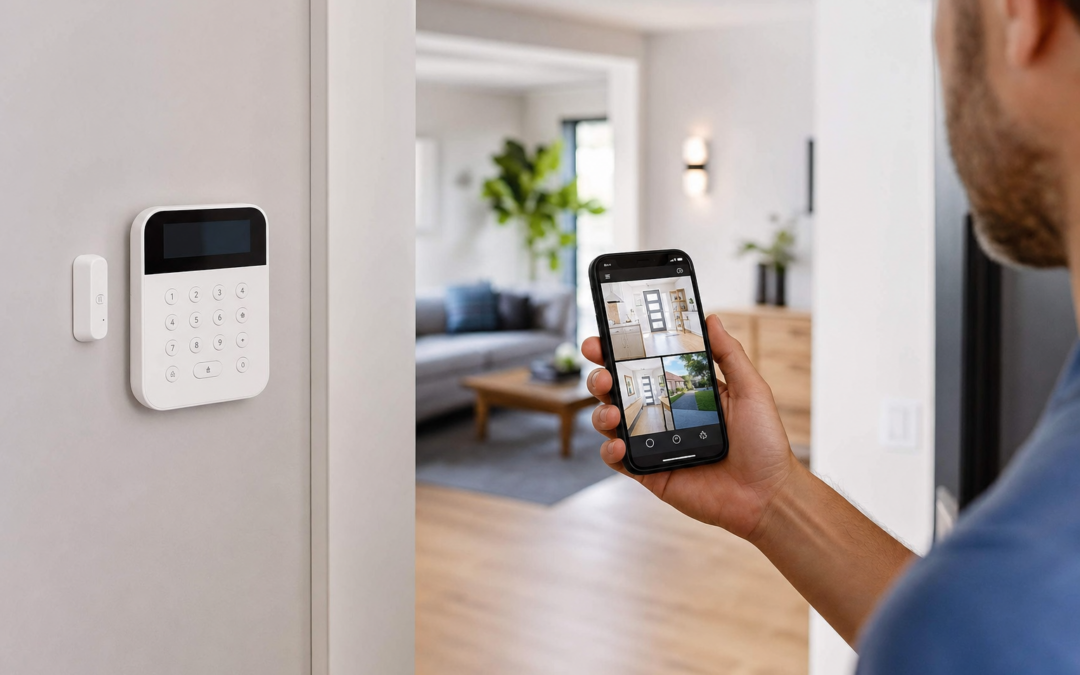
Choosing the right home security system is a major step toward protecting your family, property, and peace of mind. Whether you’re considering a DIY kit or a professionally monitored solution, it’s important to understand how sensors, monitoring, and even small details like yard signs all work together to safeguard your home. But with so many options and features on the market in 2026, making a smart decision can feel overwhelming—especially when balancing cost, ease of installation, and the risk of false alarms.
In this guide, we break down the essentials for US homeowners, from whole-home kits and sensor coverage strategies to the truth about monitoring services and the real-world habits that help reduce false alarms. You’ll also find practical advice on DIY installation, integrating with smart home devices, and why visible deterrents like yard signs still matter. We’ll arm you with the facts and actionable steps needed to secure your home with confidence.
Whole-Home DIY Kits vs. Monitored Security Systems: Core Differences
The first decision most homeowners face is whether to install a do-it-yourself (DIY) security system or invest in a professionally monitored service. Each approach has its own strengths, costs, and ongoing commitments.
- DIY Kits: These systems are designed for easy self-installation, often requiring only basic tools or adhesive strips. Kits typically include a central hub, door/window sensors, motion detectors, and sometimes cameras. You monitor your own alerts—typically through a smartphone app—and contact authorities yourself if needed. DIY kits have no monthly fees and are ideal for renters or homeowners seeking flexibility.
- Monitored Systems: Professionally monitored systems are set up by the provider (or sometimes self-installed) and include a monthly service fee. When an alarm is triggered, the monitoring center reviews the alert and contacts you and/or emergency services. This 24/7 support adds peace of mind, especially for larger homes or frequent travelers, but comes with ongoing costs and sometimes contracts.
Many modern kits blur the lines: you can self-monitor and then add professional monitoring later if your needs change. For more pros, cons, and cost breakdowns, see our home security systems overview.
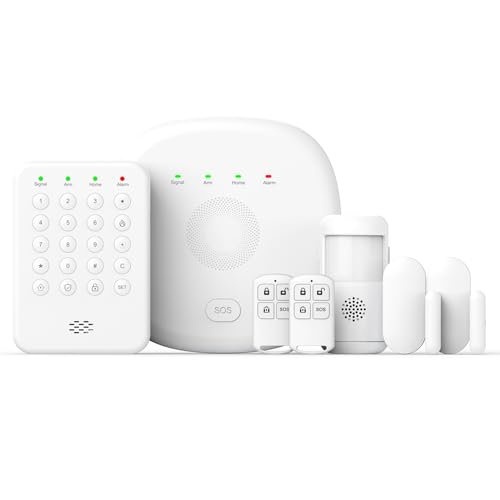
2026 Home Security System Review — An editorial look at this PGST option for home security systems — specs first, marketing second. Key figures include 1, 2 , 7 .
Sensor Coverage: What Do You Really Need?
The heart of any security system is its sensors—devices that detect unauthorized entry or suspicious activity. But how many do you need, and where should you place them?
- Entry Points: Every accessible door and first-floor window should have a sensor. For most homes, this means at least one per exterior door and one for each ground-level window that can open.
- Glass Break Sensors: If you have large glass doors or windows, consider specialized glass break sensors that “listen” for the sound frequency of breaking glass. These fill gaps where regular contact sensors may fail.
- Motion Detectors: Used to cover large interior spaces, hallways, or rooms with multiple entry points. They provide a second line of defense if an intruder bypasses window or door sensors.
- Secondary Areas: Basements, garages, and upper-level windows (especially those accessible from a deck or tree) also benefit from sensors.
A good rule: prioritize all possible entry points, then supplement with motion and glass break sensors for redundancy.

Ring Sensors: Glass Break Sensor (newest model) Review — Practical categories from Ring, summarized from hub features and listed measurements. Key figures include 2 , 53, 2.
Understanding the Types of Home Security Sensors
With technology evolving fast, today’s sensors are smarter and more reliable than ever. Here’s a brief overview of the main sensor types you’ll encounter in 2026:
- Door/Window Contact Sensors: These use magnetic contacts to detect when a door or window is opened. They’re the most common and essential component of any kit.
- Motion Sensors: Usually based on passive infrared (PIR) technology, these detect movement and are immune to small pets if configured correctly.
- Glass Break Sensors: They monitor for the acoustic signature of breaking glass, ideal for rooms with large window surfaces or sliding doors.
- Vibration Sensors: Attach to windows or doors and detect physical vibrations from forced entry attempts (like prying or striking).
- Environmental Sensors: Add-ons like smoke, CO, or water leak detectors can be integrated for extra peace of mind.
Advanced kits often let you mix and match these sensors for custom coverage. Always check compatibility when expanding your system.

Sanjie Door Window Alarm Sensors, , 125dB, Volume Control Review — SanJie home security systems gear aimed at buyers who want clear specs before they click through. Key figures include 3 , 5.
Placement Strategies: Maximizing Effectiveness and Minimizing False Alarms
Where you place your sensors is as important as how many you have. Incorrect placement can lead to missed intrusions—or frequent false alarms that train you to ignore real alerts. Here are some practical tips:
- Doors and Windows: Mount contact sensors on the frame and moving part so the magnet and sensor align when closed.
- Motion Detectors: Place about 6-8 feet off the ground, angled toward entryways or hallways. Avoid pointing at windows (which can trigger alarms from sunlight or pets outside).
- Glass Break Sensors: Mount within 20 feet of the glass surface. Avoid placing behind curtains or heavy furniture.
- Pet Owners: Choose pet-immune sensors and mount them above pet height. Test with your animals to ensure reliability.
- Test Routinely: Use your system’s “test mode” to verify each sensor’s range and responsiveness every few months.
Proper placement is key to catching real threats and avoiding nuisance triggers.
The Truth About Monitoring: Pros, Cons, and Modern Options
Professional monitoring remains the gold standard for whole-home security, but it’s not the only option. Here’s what to consider:
- 24/7 Monitoring: The monitoring center is always watching for alerts. If you don’t respond to a phone call or app notification, they’ll contact emergency services for you.
- No-Contract Plans: Many providers now offer month-to-month monitoring, so you can cancel anytime.
- DIY Self-Monitoring: Most modern systems let you receive push notifications, texts, or emails when something triggers your alarm. You’re responsible for deciding whether to call the police or fire department.
- Hybrid Models: Some kits allow you to start with self-monitoring and add professional monitoring later—ideal if you want to try before you commit.
Monitored systems offer peace of mind, but consider your lifestyle: if you travel often or can’t always respond to alerts, monitoring is a smart investment. If you’re home most of the time and want to avoid fees, self-monitoring may suit you.
False Alarms: Habits and Features that Reduce Them
Frequent false alarms can desensitize you, annoy neighbors, and even result in fines from local authorities. Most are caused by user error, pets, or poorly placed sensors. Here’s how to keep them to a minimum:
- User Codes: Teach all household members (and trusted visitors) how to arm/disarm the system with their own code or app access.
- Entry/Exit Delays: Set reasonable delays (30-60 seconds) so you can come and go without triggering the alarm.
- Pet-Immune Sensors: Select motion detectors designed to ignore pets under a certain weight (usually up to 40 lbs).
- Routine Testing: Test sensors monthly to ensure they’re working and not being triggered by drafts, loose windows, or faulty batteries.
- Notification Settings: Fine-tune your app notifications to avoid constant “low priority” alerts that could mask a real emergency.
Modern systems also offer features like “verified video” (showing a video clip of the trigger event), reducing the risk of false police dispatches.
Yard Signs and Window Stickers: Do They Really Work?
Visible deterrents like yard signs and window stickers are more important than many homeowners realize. Studies and crime reports show that homes with clear security signage are less likely to be targeted by opportunistic intruders. Here’s why:
- Instant Deterrence: A sign or sticker tells would-be burglars your home is protected, often convincing them to move on to an easier target.
- Affordable Layer: Even a basic DIY system with a professionally printed sign offers more deterrence than a system kept completely hidden.
- Placement: Signs should be placed near main walkways, driveways, or gates—anywhere intruders might approach. Window stickers belong on doors and ground-floor windows.
- Beware Fake Signs: While using a sign from a real brand is best, obviously fake or generic signs may be ignored by experienced criminals.
Remember, yard signs are not a substitute for real protection, but they do play a valuable role in layered security.

10″ x 28″ Home Security System Sign Review — An editorial look at this AzReference option for yard signs — specs first, marketing second. Key figures include 10 , 10 inch, 40 .
Smart Home Integration: Benefits and Considerations
Many of today’s home security systems can be integrated with smart home platforms like Amazon Alexa, Google Assistant, Apple HomeKit, or Samsung SmartThings. Here’s how this adds value—and what to watch out for:
- Voice Control: Arm or disarm your system hands-free, or check the status of sensors using simple voice commands.
- Automations: Link your security system with other smart devices—like turning on smart lights when motion is detected, or locking doors automatically when you arm the system.
- Remote Access: Use a single app to control your entire smart home and security setup from anywhere.
- Security Risks: Only use integrations from reputable brands and keep all devices updated to avoid vulnerabilities.
- Compatibility: Double-check that your chosen system supports your preferred smart home platform before buying.
Smart home integration can make your security system more convenient and responsive, but don’t sacrifice core security for flashy features.
The Installation Process: DIY Tips for Success
Installing a DIY security system doesn’t require advanced skills, but a little planning goes a long way. Here’s how to streamline your setup and avoid common pitfalls:
- Unpack and Inventory: Lay out all components and check against the kit’s checklist before you start.
- Read the Manual: Even if you’re tech-savvy, each system has specific steps for pairing sensors, setting up the hub, and testing alerts.
- Start with the Hub: Place it in a central location with reliable power and Wi-Fi (if needed). Avoid hiding it in the basement or a far corner of the house.
- Pair and Mount Sensors: Follow the manufacturer’s sequence for pairing sensors to avoid confusion. Use adhesive strips for easy repositioning before committing to screws.
- Test as You Go: After installing each sensor, trigger it to confirm it registers with the hub and app.
- Configure App Alerts: Set up your phone and any backup contacts to receive notifications.
- Label Everything: Use the app or physical labels to identify sensor locations for easy troubleshooting later.
DIY installation typically takes 1-3 hours for an average-sized home. If you run into issues, most brands offer video tutorials or live chat support.
Expanding and Upgrading Your System Over Time
One of the biggest advantages of DIY and modular systems is the ability to expand as your needs change. Here’s how to future-proof your setup:
- Add-on Sensors: Most major brands let you buy extra door/window, motion, or glass break sensors as needed. This is useful if you renovate or add an outbuilding.
- Environmental Protection: Many systems support smoke, CO, water leak, or freeze sensors that alert you to non-criminal hazards.
- Camera Integration: Adding cameras (indoor, outdoor, or doorbell) provides visual verification and evidence in case of an incident.
- Smart Locks and Lights: Enhance your system’s functionality with connected locks or lighting for added convenience and deterrence.
- Monitoring Services: Upgrade to professional monitoring temporarily (such as during vacations) or permanently if your risk profile changes.
Always check for compatibility and firmware updates before adding new devices to your system.
How to Choose the Best System for Your Home
With so many options, narrowing down the right system comes down to your home’s layout, your budget, and your comfort with technology. Here are a few questions to guide your decision:
- How many entry points do you need to cover? Count all exterior doors and windows that could be accessed without special equipment.
- Do you want professional monitoring? If so, check contract terms, monthly fees, and response times.
- Are you comfortable installing and configuring devices? Most systems are designed for easy DIY setup, but some homeowners prefer professional help.
- What is your budget? Factor in the upfront cost of equipment, any monthly fees, and the cost of future expansion.
- Do you need smart home integration? If you have or plan to add other smart devices, make sure your security system is compatible.
Read trusted reviews, compare specs, and prioritize reliability over flashy extras. Security is about peace of mind—not just convenience.
Final Tips: Building Habits for Everyday Security
No security system is set-and-forget. The best protection comes from combining good hardware with smart daily habits:
- Always Arm Your System: Even when you’re at home, use “stay” or “home” mode to protect against break-ins while you sleep.
- Update User Codes: Change codes or app passwords if you lose a phone or have a change in household members.
- Keep Yard Signs and Stickers Up-to-Date: Replace faded or damaged signs promptly so your deterrents stay effective.
- Check Batteries and Connections: Most sensors are battery-powered; set reminders to check and replace them regularly.
- Stay Informed: Sign up for app updates and product recalls to keep your system secure and functional.
With the right system and proactive habits, you can dramatically lower your risk of burglary or property loss—and enjoy greater peace of mind every day.
Home Security System Maintenance: Keeping Your System Reliable
Regular maintenance is essential to ensure your security system functions optimally year-round. Even the best systems can be undermined by neglected batteries, outdated firmware, or dirty sensors. Here’s how to keep your setup in top shape:
- Test Your System Monthly: Most modern systems have a “test” mode. Activate it to check that all sensors, alarms, and notifications are working as expected.
- Replace Batteries: Sensors and keypads powered by batteries typically need replacements every 1-2 years. Set reminders or check battery status in your system’s app.
- Clean Sensors: Dust and debris can interfere with sensor accuracy, especially for motion detectors and cameras. Wipe them gently with a microfiber cloth every few months.
- Update Firmware: Manufacturers release updates to improve security and fix bugs. Enable automatic updates if possible, or check manually through your app dashboard.
- Inspect Physical Components: Make sure sensors haven’t shifted, become loose, or been obstructed by furniture or decorations.
- Review User Access: Periodically audit who has access via codes or app permissions, especially after moving or changes in household members.
Regular upkeep not only prolongs the life of your system but also ensures you’re protected when you need it most.
Home Security Checklist: What to Do Before and After Installation
To maximize your home security investment, follow this step-by-step checklist before and after installing your system:
- Before Installation:
- Map all entry points—doors, windows, basement, and garage.
- Decide on professional monitoring vs. self-monitoring.
- Check Wi-Fi coverage and power sources in sensor locations.
- Gather tools (screwdriver, drill, adhesive strips) if needed.
- Download relevant apps and create your system account.
- During Installation:
- Follow manufacturer instructions closely for each device.
- Place sensors at recommended heights and angles.
- Test each sensor as you install it to confirm connectivity.
- After Installation:
- Set up user codes and app permissions for all household members.
- Configure alert preferences (push notifications, texts, calls).
- Display yard signs and window stickers to deter intruders.
- Schedule monthly system tests and battery checks.
- Review and update your emergency contact list.
This checklist can help prevent oversights that compromise your system’s effectiveness.
Common Home Security Mistakes (and How to Avoid Them)
Even with the latest technology, simple mistakes can leave your home vulnerable. Watch out for these common pitfalls:
- Ignoring Secondary Entry Points: Garages, basement doors, and upstairs windows are often overlooked but are common entry routes for intruders.
- Poor Sensor Placement: Placing motion detectors behind large furniture or too close to heating vents can result in missed detections or false alarms.
- Not Changing Default Passwords: Always update system logins and Wi-Fi passwords to prevent hacking.
- Forgetting to Arm the System: Some break-ins happen simply because the system was left disarmed. Use auto-arm features or reminders in your app.
- Neglecting Maintenance: Dead batteries or outdated firmware can render sensors useless just when you need them most.
- Relying Only on Technology: Combine your system with good habits—lock doors, trim landscaping, and build relationships with neighbors for added security.
Regular reviews and awareness of these mistakes can dramatically increase your home’s protection.
Frequently Asked Questions About Home Security Systems
Do I need professional monitoring or is self-monitoring enough?
It depends on your lifestyle and risk tolerance. Professional monitoring offers 24/7 support and automatic emergency dispatch, which is valuable if you travel often or want maximum peace of mind. Self-monitoring can be sufficient for those who are home frequently and comfortable responding to alerts themselves. Many systems let you start with self-monitoring and add professional service later.
Can I install a security system if I rent my home?
Yes. Many DIY kits are designed for renters, using adhesive mounts instead of screws and allowing for easy removal. Always check your lease and notify your landlord before installation.
Will pets trigger motion detectors?
Most modern systems offer “pet-immune” motion sensors that ignore animals under a certain weight (usually up to 40 lbs). Proper placement (aiming sensors above pet height) also helps reduce false alarms.
How do I prevent false alarms?
Test your system after installation, adjust sensor sensitivity, and educate household members on how to arm/disarm the system. Keep sensors clear of moving curtains, plants, or heat sources. If you have pets, use pet-friendly sensors and proper placement.
Can smart home devices work with my security system?
Many 2026 security systems integrate with smart home platforms like Alexa, Google Assistant, or Apple HomeKit. This allows for voice control, automation (such as lights on when an alarm triggers), and unified app management. Check compatibility before purchasing.
What if my Wi-Fi goes down?
Some systems offer cellular backup or local alarms that work even if your internet is interrupted. For critical alerts, choose a system with multiple communication options or a backup battery in the hub.