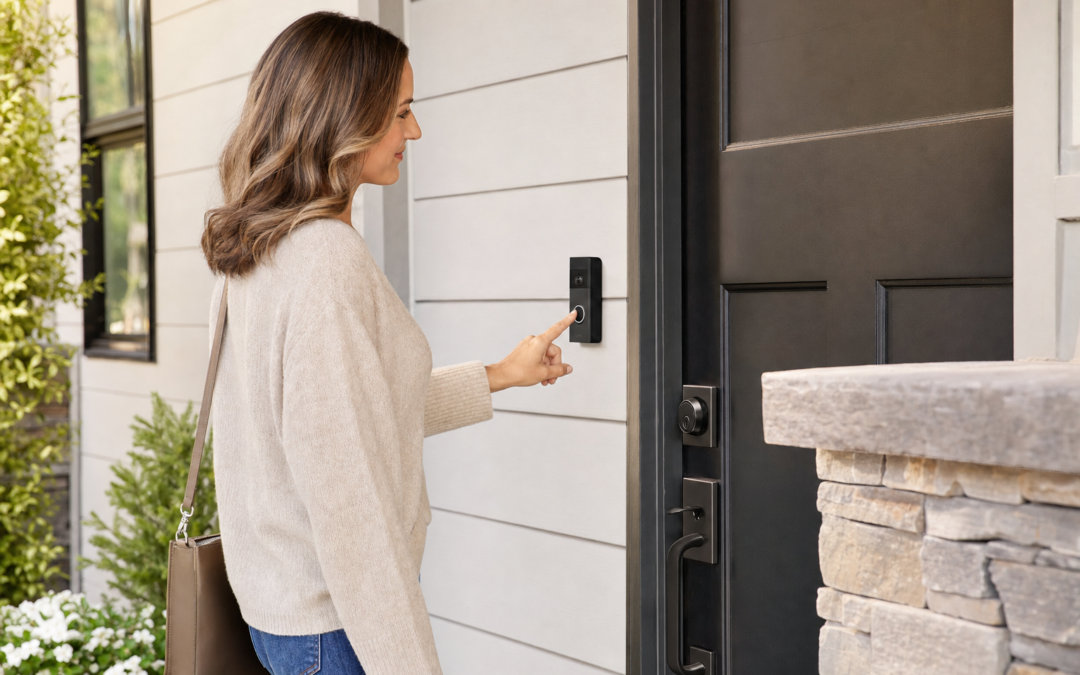
Combining a smart video doorbell with a secure deadbolt is one of the most effective ways to upgrade your front entry’s protection and convenience. This setup not only lets you see and speak to visitors before opening the door but also allows remote control of your lock, streamlining the workflow between greeting guests and granting access. Whether you’re a homeowner aiming to modernize your security or a renter looking for practical upgrades, understanding how to integrate these devices can make a noticeable difference in your home’s defense.
In this guide, we’ll walk through the workflow and best practices of pairing a video doorbell with a deadbolt for your front entry. We’ll cover everything from choosing compatible devices and installation tips to troubleshooting and maximizing daily convenience. By the end, you’ll have a clear action plan for a safer, smarter entryway.
Why Combine a Video Doorbell with a Deadbolt?
Pairing a video doorbell with a smart deadbolt creates a seamless entry protection system that covers both surveillance and access control. Here’s why this combo stands out:
- See who’s at the door: Video doorbells provide a live view and record footage of visitors, package deliveries, and suspicious activity.
- Control access remotely: Smart deadbolts let you lock or unlock the door from your phone, even when you’re not home.
- Workflow efficiency: If you recognize a visitor through the doorbell, you can unlock the deadbolt without going to the door — convenient for guests, family, or deliveries.
- Layered security: Even if someone tries to tamper with the doorbell, the deadbolt remains a physical barrier.
- Peace of mind: Both systems often offer alerts, activity logs, and integrations with other smart home devices.
If you’re interested in learning more about entry protection strategies, check out our entry protection hub for comprehensive guides and recommendations.
Choosing Compatible Devices
The first step in setting up a video doorbell and deadbolt combo is selecting devices that work well together. While most smart deadbolts and video doorbells operate independently, pairing models from the same ecosystem (e.g., Amazon Alexa, Google Home, Apple HomeKit) can streamline control and automation.
- Check platform compatibility: Before you buy, confirm that both your video doorbell and deadbolt can be controlled from the same app or voice assistant.
- Wi-Fi or hub requirements: Some deadbolts require a separate hub or bridge for remote access, while most video doorbells connect directly to Wi-Fi.
- Power sources: Decide if you want battery-powered or hardwired options for both devices. Battery models are easier for renters but require periodic charging.
- Physical fit: Ensure the deadbolt fits your existing door and the doorbell can be mounted at your preferred height.
Below are a few popular video doorbell options to consider for your setup:

Arlo Video Doorbell 2K (2nd Gen) Wireless or Wired Review — An editorial look at this Arlo option for video doorbells — specs first, marketing second. Key figures include 60, 1.45 , 0.45 pounds.

BOIFUN Video Doorbell Camera Wireless Review — An editorial look at this BOIFUN option for video doorbells — specs first, marketing second. Key figures include 166, 2.5 , 2.4 .

Blink Video Doorbell + Outdoor 4 Review — Blink categories gear aimed at buyers who want clear specs before they click through. Key figures include 4 , 4, 1 .
Planning Your Front Entry Workflow
Once you have your devices, think through how you want them to work together in daily use. The goal is to make entry management intuitive and secure for everyone in your household. Here’s how a typical workflow might look:
- A visitor rings the video doorbell.
- You receive an alert on your smartphone or smart display.
- You check the live video feed to verify their identity.
- If it’s someone you trust, you use your app or voice assistant to unlock the deadbolt remotely.
- The visitor enters, and you lock the deadbolt again with a tap or voice command.
For families, consider setting up user codes or app access for trusted individuals. For deliveries, some smart locks let you create temporary codes or schedule access during specific time windows.
Installation: Step-by-Step Overview
Installing a video doorbell and a smart deadbolt can be a DIY-friendly project, but it’s important to follow instructions carefully for both security and warranty reasons. Here’s a general outline to guide your process:
1. Remove Existing Hardware
- Take off the old deadbolt and doorbell (if present).
- Check for any damage or irregularities around the mounting areas.
2. Install the Smart Deadbolt
- Follow the manufacturer’s instructions for installing the new deadbolt. Most modern deadbolts fit standard US doors (1-3/8” to 2” thick).
- Secure the strike plate and test the lock manually before connecting electronics.
- Install batteries or connect to the required power source.
3. Mount the Video Doorbell
- Measure the mounting height (typically 48” from the ground for best face capture).
- If hardwiring, turn off power at the breaker and connect the wires as directed. For battery models, simply attach the bracket and snap in the doorbell.
- Connect to Wi-Fi and test the video and chime functionality.
4. Pair Devices in Your Smart Home App
- Set up both devices in your preferred app (e.g., Alexa, Google Home, Apple Home).
- Check for available automations or routines (e.g., “When doorbell rings, show video and unlock deadbolt”).
If you’re new to smart door hardware, some brands offer installation videos or customer support to walk you through the process.
Configuring Notifications and Access Control
Optimizing notifications and access control is key to a smooth front entry workflow. You want to be alerted promptly when someone arrives, but not overwhelmed by false alarms or constant pings. Here’s how to get it right:
- Adjust motion sensitivity: Most video doorbells allow you to fine-tune motion zones so you only get alerts for activity near your door, not passing cars or pedestrians.
- Select notification types: Decide if you want push notifications, email alerts, or smart display pop-ups. Some systems even allow custom sounds for different types of events.
- Set up user permissions: Grant app access to family members so they can manage the lock and doorbell, or assign unique codes for regular visitors.
- Automate access: Some smart locks let you schedule times when the door automatically locks or unlocks, or when temporary codes are active for cleaners, dog walkers, etc.
Be sure to review your app’s activity log regularly to spot any unusual access attempts or device errors.
Daily Use: Best Practices for Security and Convenience
With your system installed and configured, it’s time to make the most of your new entry workflow. Here are practical tips to maximize both security and convenience:
- Always verify before unlocking: Even if you recognize a visitor’s face or voice, use the doorbell’s video feed to confirm their identity before unlocking the deadbolt.
- Use two-factor authentication on your accounts: Protect your smart home accounts with strong passwords and two-factor authentication to prevent unauthorized access.
- Update firmware regularly: Both video doorbells and smart deadbolts receive regular updates to patch vulnerabilities and add features. Enable auto-updates if possible.
- Keep batteries charged: If your devices are battery-powered, monitor battery levels and have spares on hand. Most apps send low battery alerts in advance.
- Don’t forget physical keys: Many smart deadbolts include a physical key override — keep a backup somewhere safe in case of power or connectivity issues.
Integrating with Other Smart Home Devices
Pairing your video doorbell and deadbolt is just the start — you can further enhance your entry protection by integrating with other smart home devices. Here are some popular options:
- Smart lights: Set porch lights to turn on when motion is detected or when the doorbell rings, improving visibility and deterring intruders.
- Smart speakers or displays: Use Alexa Echo Show, Google Nest Hub, or Apple HomePod to see who’s at the door or unlock the deadbolt with a voice command.
- Security cameras: Add additional cameras to cover blind spots around your entryway.
- Alarm systems: Integrate with your home alarm so unlocking the deadbolt disarms the system for trusted users.
Check compatibility charts from both your doorbell and deadbolt manufacturers to see what integrations are supported.
Troubleshooting Common Issues
Even the best systems can occasionally run into snags. Here are common problems and how to address them:
- Doorbell not connecting to Wi-Fi: Make sure your router is within range and supports the required 2.4GHz or 5GHz band. Restart the device and router if necessary.
- Deadbolt not responding: Check battery levels, ensure the lock isn’t jammed, and confirm your app is up to date.
- Delayed notifications: Verify that your phone’s notification settings allow alerts from your smart home app. Sometimes, switching from Wi-Fi to cellular data can cause brief lags.
- Integration glitches: If automations aren’t working, unlink and re-link your devices in the smart home app, or reinstall the app if problems persist.
- App crashes or errors: Clear app cache, check for updates, and contact customer support if needed.
Most issues can be resolved with basic troubleshooting steps, but don’t hesitate to reach out to the manufacturer if you run into persistent problems.
Privacy and Data Protection Considerations
Smart doorbells and deadbolts collect a range of data, including video footage, access logs, and user credentials. Protecting this data is crucial:
- Review privacy policies: Read how your device manufacturer handles video storage (cloud vs. local), data sharing, and user information.
- Use encrypted Wi-Fi: Always use a strong, unique password for your home Wi-Fi network and enable WPA3 security if available.
- Limit shared access: Only grant app permissions to trusted individuals and regularly review who has access.
- Delete old footage: Set your camera to automatically delete recordings after a reasonable period, especially if cloud storage is used.
Some devices also allow you to turn off audio recording, mask parts of the camera’s view, or set up privacy zones in the app.
Maintaining Your System Over Time
Regular maintenance is the key to keeping your video doorbell and deadbolt combo running smoothly and securely. Here’s a quick checklist:
- Test devices monthly: Check that both the camera and the lock are responsive and that you can access the live feed and remote controls.
- Inspect for tampering: Occasionally check the hardware for signs of forced entry or physical tampering.
- Clean camera lenses: Use a microfiber cloth to keep the doorbell camera lens clear for the best image quality.
- Update software: Stay on top of firmware and app updates for security and new features.
- Replace batteries as needed: Mark your calendar to check battery-powered devices every few months.
Consistent upkeep helps prevent small issues from becoming big problems and ensures your front entry stays protected.
Frequently Asked Questions
- Can I install both devices myself? Most video doorbells and smart deadbolts are designed for DIY installation, but always follow the manufacturer’s instructions. If you’re not comfortable with wiring or drilling, consider hiring a professional.
- What if my Wi-Fi goes down? Many smart deadbolts have a physical key backup. Video doorbells may record locally to an SD card, but you’ll lose remote access and notifications until Wi-Fi is restored.
- Are these systems secure from hackers? Using strong passwords, two-factor authentication, and regular updates greatly reduces the risk. Choose reputable brands and avoid sharing access unnecessarily.
- Do I need a subscription? Some video doorbells offer basic functionality for free but require a subscription for cloud storage or advanced features. Deadbolts rarely require ongoing fees.
- Can I use a smart lock with a traditional doorbell? Yes, but you’ll lose the integrated workflow benefits of seeing and speaking to visitors before unlocking the door.
Final Thoughts: Building a Smarter, Safer Entryway
Integrating a video doorbell and smart deadbolt is a practical, effective way to improve both the security and convenience of your front entry. With the right devices, a thoughtful workflow, and regular maintenance, you can greet visitors, manage deliveries, and control access to your home from anywhere — all while keeping your property protected.
For more advice on entryway security, including product reviews and upgrade ideas, visit our comprehensive entry protection resource.
Pre-Installation Checklist
Before installing your video doorbell and deadbolt combo, it’s important to prepare properly. Use this checklist to ensure a smooth setup and avoid common pitfalls:
- Measure your door and frame: Confirm that your chosen deadbolt and doorbell will fit your existing hardware and available space.
- Verify Wi-Fi strength: Test your Wi-Fi signal at your front door to ensure strong connectivity for both devices. Consider a Wi-Fi extender if needed.
- Gather necessary tools: Typical tools include a screwdriver, drill (if installing a new deadbolt), measuring tape, and a smartphone or tablet for app setup.
- Charge or install batteries: If using battery-powered devices, fully charge them before beginning installation.
- Download device apps: Install the relevant apps for both your video doorbell and deadbolt, and create accounts if you don’t already have them.
- Have your home’s Wi-Fi password ready: You’ll need this for connecting both devices during setup.
- Check local regulations: If you live in an apartment or rental, ensure your landlord permits modifications to the entryway.
Completing these steps ahead of time will save you frustration and help your installation go smoothly.
Common Mistakes to Avoid
Even with smart devices, there are pitfalls that can undermine your security or convenience. Here are some of the most frequent mistakes homeowners make — and how you can avoid them:
- Ignoring compatibility: Don’t assume all smart locks and doorbells will work together. Check for platform and integration compatibility before purchasing.
- Poor placement: Mounting the video doorbell too high or too low can limit its field of view. Follow the manufacturer’s recommended installation height (usually 48-52 inches from the ground).
- Weak Wi-Fi connection: A spotty connection can cause delays or missed notifications. Always test signal strength before finalizing installation.
- Skipping firmware updates: Outdated software can expose your devices to vulnerabilities. Enable auto-updates or check regularly for new firmware.
- Reusing old hardware: Using worn screws or strike plates can compromise the security of your deadbolt. Always use the new components provided.
- Forgetting to secure physical access: Smart features are great, but don’t overlook the basics — reinforce your door frame and consider a security plate for added protection.
By planning ahead and double-checking your setup, you’ll get the most out of your video doorbell and deadbolt combo.
Maintenance Tips for Longevity
Smart security devices require regular maintenance to keep them performing at their best. Here’s how to maximize the lifespan and reliability of your video doorbell and deadbolt:
- Clean camera lenses: Wipe the video doorbell lens with a soft, dry cloth to prevent image distortion from dust or smudges.
- Check battery status: For battery-operated devices, set reminders to check and recharge or replace batteries every few months, or as indicated by the app.
- Test lock operation: Periodically test your deadbolt both manually and via the app to ensure smooth operation.
- Inspect mounting hardware: Tighten any loose screws on both the doorbell and deadbolt to prevent tampering or accidental damage.
- Review activity logs: Regularly monitor your app’s activity history for any unrecognized access attempts or system errors.
- Update software: Keep both the doorbell and deadbolt apps updated to benefit from the latest security patches and features.
Consistent maintenance not only extends device lifespan but also ensures your security system remains dependable year-round.
Frequently Asked Questions
Can I install a video doorbell and smart deadbolt if I rent?
Yes, many smart doorbells and deadbolts are designed for renters. Look for models that don’t require drilling or permanent modifications. Battery-powered devices and adhesive mounts can often be removed without leaving marks. Always get your landlord’s permission before installation.
Do I need professional installation?
Most video doorbells and smart deadbolts are designed for DIY installation, with step-by-step instructions in the app or included manual. However, if you’re not comfortable with tools or electrical work (for hardwired doorbells), hiring a professional can save time and ensure proper setup.
Will my devices work during a power outage?
Battery-powered video doorbells and deadbolts will continue to function during a power outage. However, if your Wi-Fi router loses power, you’ll lose remote access and notifications. Consider an uninterruptible power supply (UPS) for your router for added resilience.
How secure are smart deadbolts compared to traditional locks?
Smart deadbolts offer similar physical security as traditional high-quality deadbolts but add features like activity logs and remote control. Choose models with strong encryption and reputable brands to avoid vulnerabilities. Reinforcing your door frame and using a security strike plate further improves protection.
Can I integrate my doorbell and lock with other smart home devices?
Yes, many systems support integration with voice assistants (like Alexa or Google Assistant), smart lights, or security cameras. Check for compatibility with your preferred smart home ecosystem to create automated routines, such as unlocking the door when you recognize a visitor or turning on lights when motion is detected.
What happens if I lose my phone?
If your phone is lost or stolen, immediately change your account passwords and use the manufacturer’s website to revoke access. Most apps also support multi-factor authentication for added account security. Always set up backup access methods, such as physical keys or PIN codes.
Smart Entry System Best Practices
To get the most out of your video doorbell and deadbolt combo, consider these best practices:
- Create unique user codes: Assign individual PINs to family members or trusted visitors, and delete codes when they’re no longer needed.
- Set up instant notifications: Enable real-time alerts for doorbell rings and lock/unlock events so you’re always aware of activity at your entryway.
- Use two-factor authentication: Secure your app accounts with two-factor authentication to prevent unauthorized access.
- Test emergency features: Familiarize yourself with manual override options, such as using a physical key or backup battery, in case of device failure.
- Regularly review permissions: Periodically audit who has access to your devices and update permissions as needed.
Smart entry systems are only as secure as their weakest link, so regular reviews and updates are essential for ongoing home protection.